7 Best AI Tools for Business: Tested, Compared in 2026

Sep 22, 202422 min read
The deciding criterion is whether the assistant sits inside the suite or knowledge base where your documents, mail and tickets already are. Everything else follows from that placement.
Treat the table below as a screening step.
It sorts each tool on four dimensions: where it lives, what an administrator can control, how it bills, and whether it acts across apps. Any row whose "where it lives" doesn't match your current tools has to justify a second system.
Criteria: Where Your Work Already Lives
| Tool | Where it lives | Admin controls | Price and period | Acts across apps |
|---|---|---|---|---|
| Microsoft 365 Copilot | Inside Microsoft 365 apps | Existing Microsoft 365 permissions and admin center | Per user, monthly | Mainly within Microsoft 365 |
| Gemini | Inside Google Workspace | Workspace admin console | Per user, tied to the Workspace plan | Mainly within Google apps |
| Slite Agent | Inside the Slite knowledge base | Slite workspace permissions | Per member, tied to the Slite plan | Answers from the knowledge base |
| ChatGPT Enterprise | Its own workspace, reaching other tools through connectors | Enterprise admin console | Per seat, under contract | Through connectors |
| Activepieces | Separate workflow layer | Custom RBAC and isolated projects, with credentials held centrally | Covered in its own section | Yes, across many apps |
| Synth (excluded) | Excluded | Excluded | Excluded | Excluded |
Prices and plan limits checked against slite.com and vellum.ai and frntir.ai and openai.com and docs.claude.com and claude.com and openai.com and gemini.google on November 1, 2026.

I left out Synth by Frntir because I couldn't verify its claims independently. A comparison the reader can't check doesn't belong in a buying decision. Next come the four criteria behind the columns.
When the assistant is embedded, it works on content in place. A separate tool needs that content copied, connected or re-indexed first. The constraint to state up front is migration: every connector is a new integration to approve, secure and maintain.
Inside a suite, an assistant generally inherits the access rules already set there. A person who can't open a file can't have the assistant summarise it. A separate tool must rebuild those rules through its own connectors. Before any trial, check three things:

- Whether the assistant reads with the asking user's permissions or with a shared service account.
- Which admin role can switch features off for a group.
- Whether the audit log records what the assistant retrieved.
AI tool cost per user and billing period
Compare the unit (user, member or seat) and the period (monthly or contract term). The per-seat chart that follows opens with Microsoft and Google, and the two bill differently. One is a separate per-user line, the other follows the Workspace plan.

So the budget question is whether you're adding a line item or changing a plan, because the second can reprice people who'll never use the assistant. A seat count that exceeds actual users is a recurring cost with no return.
Answering questions and drafting content inside their own boundary is what most embedded assistants do. Acting means changing records in several systems without a person copying data between them.
Only when that's the requirement does a workflow layer enter the decision, and the one this article prices is Activepieces, whose MIT-licensed core carries 746 integrations, which means you'll find almost any third-party system already built in.
If the work stays inside one suite, the embedded assistant is the smaller change to approve.
The fastest way to settle a shortlist is to try one. Activepieces is free to try, no credit card.
Microsoft 365 Copilot
Copilot is the smaller change. That holds for a company whose documents, mail and meetings already live in Microsoft 365.
It works inside Word, Excel, Outlook and Teams, so nobody opens a new tool or moves any data. The constraints are licence cost and the state of your file permissions. Settle both before approval.
At $21 per user per month for Copilot Business and $30 for Copilot Enterprise, per Alphavima's pricing breakdown, 100 users cost $2,100 a month on Business or $3,000 on Enterprise. That comes to $36,000 a year at the higher tier.

In that same source, Alphavima lists Google's Gemini Starter at $7 per user per month, so the monthly cost grows with the number of users.
That's a third of the Business price, but it only matters if your staff work in Google's suite. Price the seats you will actually assign, not the headcount, because each licensed user costs money every month.
Ask Copilot a question and it answers from whatever the asking user can already open.
SharePoint, Microsoft's document store behind Teams and OneDrive files, is where over-broad access tends to sit. A folder shared with "everyone in the company" years ago becomes searchable through a chat prompt. Before rollout, run this sequence:

- List the sites and libraries that hold payroll, legal, board and customer-contract files.
- Compare each one's sharing settings against the people who should see it.
- Remove inherited "everyone" access and replace it with named groups.
- Pilot with one team, and ask the assistant for the documents you just locked down, to confirm it can't retrieve them.
You can repeat step 4 and check the result. Skip it and you find the gaps in production.
When work begins and ends in Microsoft's apps, Copilot is strongest: summarising a Teams meeting, drafting a reply in Outlook, building a pivot in Excel.
Once a process must read from a web page, call a model, and write the result to an app outside Microsoft's suite, Copilot is less suited. That job needs a workflow layer on top.
The flow below is of that kind. Step 4, "Remove HTML Tags", strips the fetched page down to plain text.
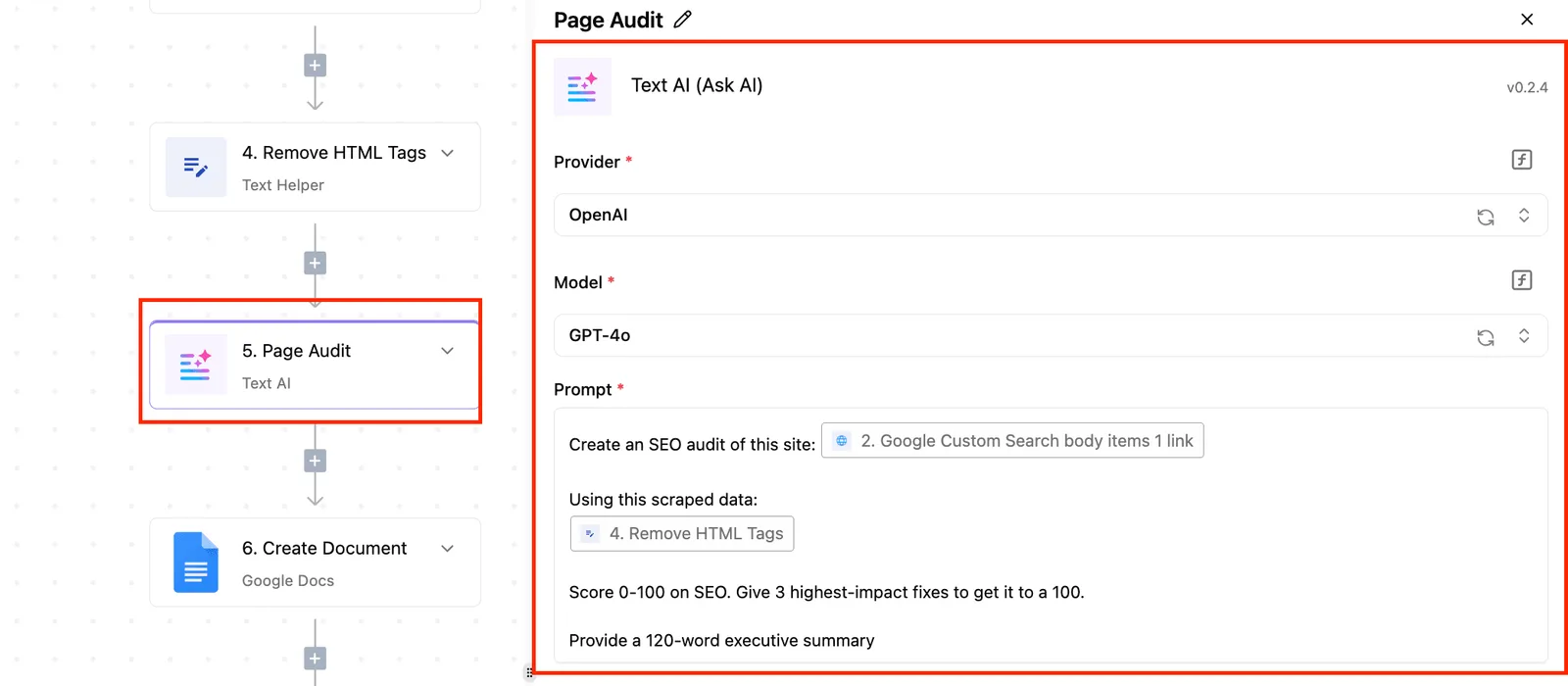
Step 6 writes the result into a Google Docs file.
The AI step is one box among six. The apps on either side of it don't need to share a vendor with the model.
Gemini for Google Workspace teams
For a team whose documents, mail, spreadsheets and meetings already sit in Google's apps, Gemini in Google Workspace is the right default. It asks you to adopt nothing new.
If the answer to "how many flows, across how many apps" is "a few, all inside Google," stop here.
Start with the constraint: every new tool means a procurement cycle, a security review and a new set of permissions to audit.
You review no second access model, because Gemini inherits the Workspace account, the sharing rules on each file and the admin console you already run, and it reads what a user can already open and nothing more.
For a team with a fixed audit window, that's most of the argument.
Its strengths are the ordinary ones:
- It summarizes a long mail thread in Gmail without the text leaving the app the user is in.
- It drafts and rewrites inside Docs, where the document and its comment history already live.
- It answers questions over files in Drive, using the permissions those files already carry.
- It works on tables in Sheets, next to the data itself.
On price and plan inclusion, Google changes both, so read the current Workspace pricing page on the day you buy rather than relying on this article.
Confirm two things on that page: whether your edition bundles Gemini or sells it as an add-on, and which admin controls come with it. A blog post can't settle either.
Once the work spans a ticketing system, a CRM and a chat tool, an assistant living in Docs and Gmail has no natural way to reach them. That is the limit: its value ends where Google's apps end.
If the work must run on a schedule with nobody present, it is a different job, because Gemini works mainly when a person opens it and asks.
Below, a flow shows where that boundary falls. It runs every Monday at 10 am UTC, reads rows of employee feedback from a Google Sheet, and passes them to an AI step for summarizing.
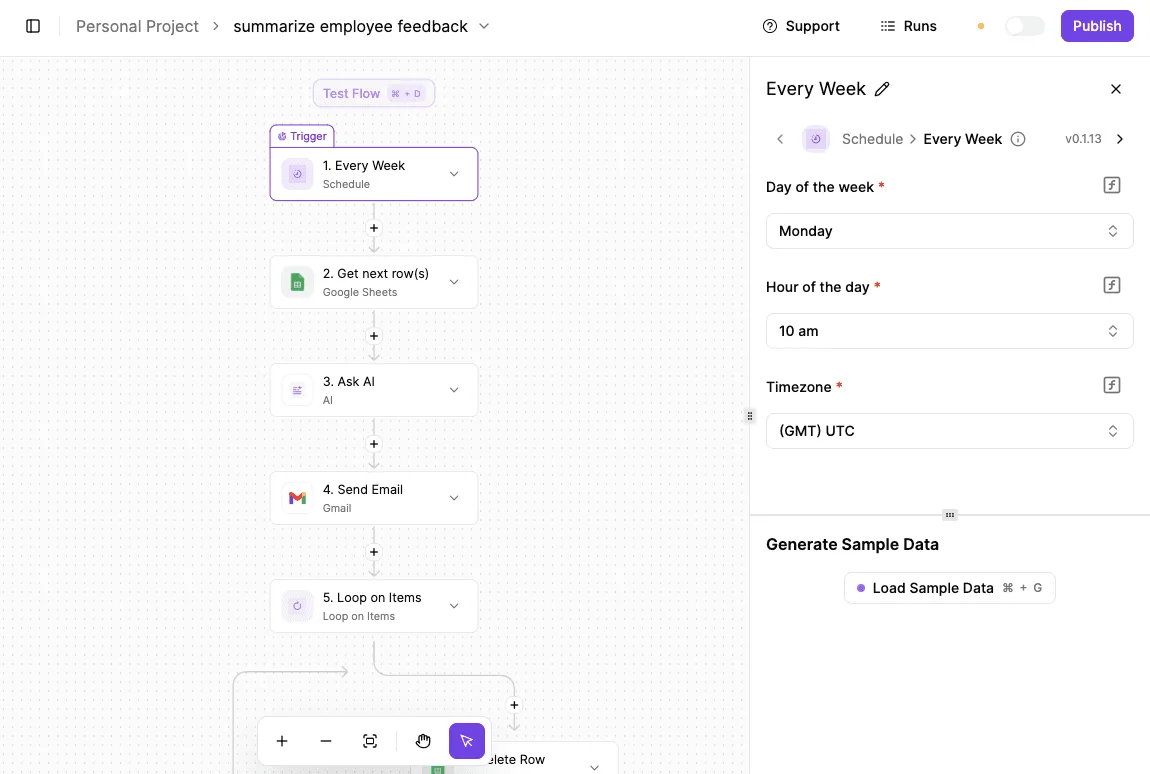
It then sends the result through Gmail and loops over the remaining items.
Because both data apps are Google's, the content of the task is already inside Workspace. What's not inside the assistant is the schedule and the loop, which are the parts that run without a person.
That leaves a short test to apply to any candidate flow:
- List every app the flow reads from or writes to.
- Mark each one that isn't a Google app.
- Mark each step that must run unattended, on a timer or an event.
If steps 2 and 3 come back empty, the embedded assistant covers the work. If step 3 alone has entries, the schedule is the gap. If both have entries, you're describing the cross-app case that justifies a separate workflow layer.
Activepieces covers that cross-app case without a second integration project for your agents.
Once an integration is connected, it runs as a step in a flow and also appears as a tool on the per-project MCP server, so Claude, ChatGPT, Cursor or an agent you built yourself can call it.
The integration action a flow executes is the identical code the MCP server exposes as a tool; that code sits in packages/pieces of the MIT-licensed core repo, which holds 746 integrations, and the Integrations Framework and MCP Server documentation lays out both the flow step and the tool schema it produces, so you maintain each integration once instead of twice.
MoneyGram, Moneypenny, Alan and FundingSocieties run it.
1. Slite Agent for wiki-based business teams
For $10 or $20 per user per month, Slite's AI layer answers from your team's docs, with no separate workflow tool needed, eliminating the cost of licensing a separate automation platform.
That holds if the work you listed lives in one place, and that place is a team wiki.
Here the constraint is plain: Slite is a docs and knowledge base platform, and its AI reads what the team has written down.
Per Slite's pricing page, the Pro plan adds the Slite Agent, described there as an agent-powered knowledge base that stays in sync with your tools.
That fits small and mid-size teams whose process, policy and onboarding knowledge sits in notes, because nothing has to be wired up before the first question gets an answer.
The plan split decides what you get. The table below compares Basic ($10 per user/month, billed yearly) with Pro ($20, the plan Slite recommends), per Claude.
Read it for one thing: only Ask is on the cheaper plan, so every agent capability depends on paying double per seat.
As of 1 November 2026, prices are as listed on the pricing page, and vendors change them, so confirm before budgeting.
| Capability | Basic ($10) | Pro ($20) |
|---|---|---|
| Ask | Included | Replaced by Slite Agent |
| Slite Agent | Not included | Included |
| Connected-tool search | Not included | Included |
| Fact-checking | Not included | Included |
| Agent workflows | Not included | Included |
| 50 credits | Not included | Included |
Two consequences follow from the table. First, a team that wants only question-and-answer over its docs can stay on Basic, since Ask is there.
Second, SSO sits on the same plan as the agent features, so a team whose security review requires single sign-on can't buy Basic and upgrade a few seats later. Pro is the starting point, priced for every seat.
The strengths are narrow and real:
- Answers come from documents your team already owns, so a reader can open the source page and check the claim.
- Fact-checking, on Pro, is aimed at the usual wiki failure, where pages go stale and nobody notices.
- Connected-tool search lets a question reach beyond the wiki into the tools linked to it, which reduces the number of places a person has to look.
The limits matter as much. Slite Agent is only as good as the wiki beneath it. If pages are thin, duplicated or out of date, the answers will be too, and fact-checking can flag the problem but can't write the missing page.
Nor is Slite Agent a workflow engine: it's a knowledge base with agent features. Its agent workflows operate around your documentation. They aren't a substitute for something that moves records between a CRM, a ticketing system and a billing tool on a trigger.
Before paying, run this test: take ten questions your team asks repeatedly, check whether each has a current page in the wiki, and count the gaps.
A high gap count says to fix the documentation first. A low one says the assistant will have something to work with.
Reading a table only gets you so far. Build the same workflow in Activepieces and compare it yourself.
2. ChatGPT Enterprise for mixed-suite teams
If no single office suite dominates how your people work, ChatGPT Enterprise is the best fit: OpenAI's company-wide assistant, with admin controls and no training on business data by default.
It's a standalone product, and that is the constraint. It doesn't live inside your documents, spreadsheets or mail client, so people open it in a separate tab and paste work across. Whether that's acceptable depends on how many of your people already do so unprompted.
One indicator is a survey by Surista of Japanese workplace users, asking which AI tools they reach for.
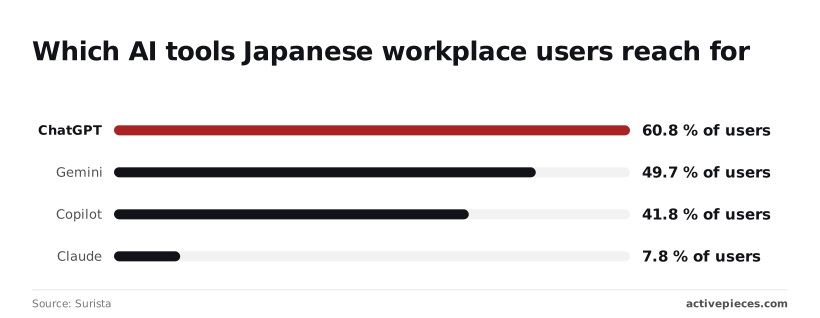
ChatGPT came first at 60.8 % of users, ahead of Gemini at 49.7 % and Copilot at 41.8 %, making it most teams' default starting point. Claude stood at 7.8 %, leaving it far behind the three market leaders.
Since respondents could evidently name more than one tool, the shares add up to well over 100 %. So a majority of this sample already use ChatGPT, which means a rollout is more likely to formalise existing habits than to start new ones.
Right now, unprompted ChatGPT use sits outside any admin's view, and an Enterprise agreement is how it comes under your controls.
Read the figures as a sign of familiarity, not as a measure of fit, because they describe one country's workplaces, not yours.
Strengths: admin controls, security and compliance, no training on business data by default. Limits: sales-led buying, no listed seat count, no trial, not embedded in documents.
That list is the buying decision in short, and the limits are procedural, so they're best checked before a pilot is planned:
- OpenAI's pricing page says only that "Business and Enterprise are for businesses." Its main comparison covers the Free, Go, Plus and Pro plans. No Enterprise price is published, so a budget figure can't be set until you've talked to sales.
- No seat minimum or maximum is listed. Ask for it in writing, because it decides whether a small team can join at all.
- No trial is listed. Test the assistant on the free or Plus plans with non-sensitive material first, and remember that those plans don't carry Enterprise's admin controls or its default of no training on business data. Results from them say little about your compliance position.
- Sales-led buying means a quote, a review and a contract. Allow for that before any audit window or rollout date you are working to.
3. Activepieces
When your work is spread over many tools, or your rules keep data inside your own network, Activepieces fits. It is an automation platform with an MIT-licensed core that lets an AI agent act across 746 integrations, and you can self-host it, avoiding vendor lock-in.
Here is the constraint: a chat assistant answers inside its own window. It doesn't open the ticket, update the CRM record and post to the team channel unless something connects those apps for it.

Activepieces connects them. You build flows, each a trigger followed by steps, and the steps can call an AI model, branch on its answer, and write the result into the other apps through prebuilt integrations, roughly 60% of which the community contributed.
It isn't a chat assistant, and nobody will talk to it the way they talk to the assistant in their existing suite.
Self-hosting and your data path
For teams with audit or network restrictions, self-hosting matters. You can run it on your own infrastructure, so the flow engine and its run history stay with you. That removes one vendor from the data path.
Unless you point it at a model you host yourself, any model call still leaves your network, so check that part separately.
What it costs at volume
Past the plan's included allowance, each run costs $0.007, so cost on the hosted plan is driven by run volume and your total becomes usage-dependent. The chart shows monthly cost climbing from $20 at a single run to $550 at 100,000 runs.
A team running a handful of flows pays the same $20 base as one running a few hundred, because the base is a fixed floor.
At 100,000 runs the bill is $550, which works out to roughly half a cent per run.
That's cheap for a flow that replaces ten minutes of someone's copy-and-paste. It isn't cheap for a flow that fires on every incoming email, and that's where self-hosting starts to pay for itself.
How to start with AI workflow tools
The sequence I would follow:
- Name one task that crosses at least three apps and is repeated weekly.
- Confirm the existing suite's assistant can't already do it. If it can, stop here.
- Build that single flow, with a human approval step before any write to a system of record.
- Count the runs for one month and compare the total against the cost curve.
- Decide between hosted and self-hosted only after step 4, using the measured volume.
Setup cost and when to skip it
Setup is the real cost. Someone has to build, test and maintain the flows, and when an app changes its interface, a flow can break without anyone noticing. Budget owner time for that.
Pick something else if your work lives mostly in one suite or knowledge base, since its built-in assistant needs no setup and no extra run charges.
Also pick something else if nobody on the team will own the flows. An unmaintained automation layer is worse than none.
Other workflow layers are the better pick in some teams
Activepieces is not the only way to add a workflow layer, and for some teams it isn't the best one. Zapier, Make and n8n are the usual alternatives, and each beats it on at least one of the criteria used above.
I haven't priced them here, so confirm current plans and run limits on each vendor's page before comparing totals.
Zapier is the one to consider when nobody on the team wants to run anything. It is hosted only, it has long been the default name for connecting business apps, and its catalog of connected apps is very large.

- Admin controls
- billing
- uptime
are the vendor's problem rather than yours. The trade-off is the reverse of Activepieces: you can't self-host it, so a rule that keeps data on your own network rules it out.
Make sits between the two. It is hosted, built around a visual canvas where branching and data mapping are easy to see, and it suits an operations person who thinks in diagrams more than in code.
Like Zapier, it keeps the flow engine and its run history on the vendor's side. A team that is happy with that, and that wants a clear picture of what each scenario does, can reasonably choose it.
n8n is the An alternative for teams with the same self-hosting requirement. It can run on your own infrastructure and is popular with technical teams who want to write code inside a flow.
Its licence is source-available rather than MIT, which matters if your legal review cares about the exact terms, and the same ownership warning applies: someone has to maintain the flows. If your engineers already know it, that familiarity can outweigh any difference in catalog size.
Judged on the article's own test, the rule is the same for all of them. If the work stays inside one suite, none of these is needed.
If it crosses apps, choose by two questions: must the engine run on your own infrastructure, and who will own the flows? Hosted-only tools win when the answer to the first is no and the team is small.
A self-hostable one wins when the answer is yes.
One more name in the table below, Vellum, belongs to a different job. It is an open-source personal AI assistant that runs on a computer you size, from $30 a month, so it solves an individual-assistant problem and not a team suite or product-development one.
Treat it as a separate purchase, not a rival to any pick above.
Choosing AI tools for your suite
Pick the assistant built into the suite or knowledge base where your documents, mail and tickets already live, and add anything else only for a gap you can name. A workflow layer you must maintain is a cost; an embedded assistant isn't.
Match your situation to a pick
Because teams also run more than one assistant at once, the pick below is a starting point, not an exclusive commitment.
A workflow layer you must maintain is a cost; an embedded assistant isn't.
The table pairs each situation with a default and the one thing to verify before paying for seats. Read the last column first: it's the constraint that most often overturns the default.
| Situation | Pick | Why | Check first |
|---|---|---|---|
| Microsoft shop | Copilot inside Microsoft 365 | It works on the files, mail and meetings already in your tenant | Whether file permissions are tidy, since the assistant surfaces whatever a user can open |
| Google shop | Gemini inside Google Workspace | It reads Docs, Drive and Gmail without a new integration | Which Workspace edition you hold and which features it includes |
| Wiki-heavy team | The AI built into your wiki | Answers come from pages your team already maintains | How stale the pages are; the assistant repeats them as fact |
| Compliance-driven assistant | One company-wide assistant with admin controls | A single vendor review and one audit trail instead of many | Data retention terms, logging and where data is processed |
| Many-app or self-hosted AI | A workflow layer | It lets AI act across apps and can run on your own infrastructure | Who owns upkeep, and whether it must run with no outbound internet |
| Personal AI assistant | Vellum | It's an open-source personal assistant that runs on a computer you size, not a team suite tool | Which computer tier and credit usage you need, since credits are pay-as-you-go |
Resolve the "check first" column before the pilot, because each item decides whether the pilot is even permitted to start.
Run the pilot as a numbered change request, with a fixed end date.
- Choose one team and one embedded assistant. Ten people is enough.
- Audit permissions before anyone logs in. An assistant that searches everything a user can open will expose every over-shared folder.
- Record the cost per seat. Anthropic's Claude pricing page lists Pro at $17–20 per user per month and Team standard at $20–25, with the lower figure applying to annual billing. Ten Team standard seats therefore cost $200–250 a month, so the billing term changes the budget by up to $50 a month.
- Price the heavy tier separately. Team premium is $100–125 per user per month, roughly five times the standard seat, so buy it only for the few people who demonstrably hit standard limits.
- At the end date, count tasks completed, not logins.

When to add a workflow layer
Add one when a task needs the AI to act across several apps, such as reading a ticket, updating a CRM and posting to chat. In that case the embedded assistant stops at its suite's boundary.
If the work stays inside one suite, a workflow layer only adds something to maintain, and the Activepieces section showed what that costs when nobody owns it: flows that can break unnoticed while the $20 monthly base keeps billing.
Related reading
Still comparing
The fastest way to settle it is to build something.
Open source under MIT, so you can self-host the same thing later.
Start free Talk to sales