
Claude Haiku 5.5 API Pricing: Rates and Costs for 2026

Nov 10, 202616 min read
Haiku 5.5, Anthropic's small, fast model tier, costs $0.10 per million input tokens and $0.50 per million output tokens on the API, according to Anthropic's pricing page.
Claude Haiku 5.5 API pricing, plan by plan
Your overall cost depends on how much you use the API, whether you call it directly or from a workflow tool like Activepieces. Billing is per token, not per seat.
Claude Haiku 5.5 API pricing table
Read the table as a rate card, not a bill: nothing here tells you what a finished task costs. It lists every price I could confirm and marks the rest unverified.
| Line item | Haiku 5.5 figure | Source | Check date |
|---|---|---|---|
| Base input | $0.10 / MTok | Anthropic pricing page | 2026-10-14 |
| 5-minute cache write | $0.125 / MTok | Anthropic pricing page | 2026-10-14 |
| 1-hour cache write | $0.20 / MTok | Anthropic pricing page | 2026-10-14 |
| Cache read | $0.01 / MTok | Anthropic pricing page | 2026-10-14 |
| Output | $0.50 / MTok | Anthropic pricing page | 2026-10-14 |
| Batch | unverified | unverified | unverified |
| Context window | unverified | unverified | unverified |
| Entry rate limit | unverified | unverified | unverified |
Prices and plan limits checked against docs.claude.com and claude.com and openai.com and gemini.google on October 14, 2026.

If you budget before reading your own account's limits, three of the unverified rows most often turn a cheap estimate into a surprise. Treat them as open questions until you have.
What per-token billing means for a buyer
Take a task that sends 10,000 input tokens and returns 1,000. Input costs $0.001 and output costs $0.0005, so $0.0015 in total.
Output is a tenth of the tokens but a third of the bill, which is why output length matters more than the headline input rate.
Once a prompt repeats, caching changes the picture. Anthropic notes that a cache read at $0.01 per million is a tenth of base input, so a prompt you reuse pays for itself quickly.
You pay only a little extra to write to the cache, per Anthropic: $0.125 for the 5-minute cache and $0.20 for the 1-hour cache, so the longer window costs 60% more to write than the shorter one.

Choose it only if your reuse gaps are long enough to need it.
Consumer plans versus API billing
None of these token rates touch a chat subscription, which is a flat monthly fee. Per Claude, the Free tier is $0, and Pro is $17 a month on annual billing ($200 up front), so you commit a year to get that price.
At $8 a month for Go and $20 for Plus, OpenAI's ChatGPT, per Claude, makes it possible to set a predictable monthly budget.
Google's Gemini has a free plan and Google AI Plus at $4.99 a month per Gemini, which means you can evaluate the service without cost before upgrading.
Those fees buy a person's chat access, which tells you nothing about what a thousand automated runs will cost.
Activepieces allows unlimited flows on every plan, including free, so the number of automations you build never enters the bill; credits meter AI usage, and with Bring-Your-Own-Key the Haiku 5.5 token spend lands on your own provider invoice, where per-project and per-person caps and usage visibility keep it in view.

If you are running this arithmetic for your own team, see what the same workload costs on Activepieces.
Haiku 5.5 realistic costs and price drivers
At $0.10 per million input tokens and $0.50 per million output tokens, three realistic workloads cost between $4.50 and $250 a month. The list price tells you little until volume or prompt length climbs.
The table uses my assumed token counts per request; swap in your own.
| Workload | Requests per month | Input / output tokens per request | Arithmetic | Monthly cost |
|---|---|---|---|---|
| Support triage | 10,000 | 3,000 / 300 | 30M × $0.10 + 3M × $0.50 | $4.50 |
| Document extraction | 1,000,000 | 1,500 / 200 | 1,500M × $0.10 + 200M × $0.50 | $250 |
| Agent loop | 2,000 runs | 60,000 / 5,000 | 120M × $0.10 + 10M × $0.50 | $17 |
About 55 times: that is what document extraction costs against triage, and volume, not model choice, drives that gap.
Haiku 5.5 cost for support triage
Add a 20% retry rate and you still pay under a dollar more on the $4.50 bill, which is $3.00 of input and $1.50 of output.
Developers Digest lists input at $0.10 to $0.50 per million tokens, with the top rate applying to long prompts. At that rate triage rises to $22.50, still too small to argue about.
If your workload looks like this, the thesis doesn't bite and list price is a fair guide.
Here the fivefold jump matters for document extraction: $250 becomes $1,250 if long prompts push you to the top input rate and the $2.50 output rate.
That's a $1,000 monthly swing from prompt length alone. Output is the lever to watch, since it already accounts for $100 of the $250.
Output length, retries and cache misses
At every tier, output costs five times input, so a chatty model that doubles its answers adds more than a prompt trimmed by a third saves.
Each retry pays for the full input again. Cache reads are listed at $0.01 to $0.05 per million tokens, a tenth of the matching input rate.
When a cache expires between requests, you silently return to full price on the agent loop's 60,000-token context.
When a throttle forces queuing or retries, a $17 agent budget grows into a larger one without any price change. Check which tier your monthly spend lands in and what it caps before you commit.
Haiku 5.5 against its closest alternatives
No list-price gap with a neighbor tells you which model costs less for your work, even though Haiku 5.5 is the cheapest Claude to start on. Only cost per finished task, measured on your own prompts, does.
Haiku 5.5 versus the larger Claude tier
One tier up sits Sonnet 5.5, positioned as the best combination of speed and intelligence. Its per-token rates sit above Haiku's on each dated pricing page, and that gap is the number everyone quotes.
Ask instead whether the dearer model finishes in fewer attempts. Every retry on Haiku bills the full input again plus fresh output, so a modest failure rate can erase the saving. If Haiku passes cleanly, the gap becomes real money at volume.
Run the same batch of tasks through both. Count retries and output tokens, then divide total spend by the tasks that passed review. That quotient is the only price worth putting in a budget.
Haiku 5.5 versus GPT-6 Luna and Gemini Flash-Lite
Two small rivals sit nearest: OpenAI's GPT-6 Luna, built for cost-sensitive high-volume work, and Google's Gemini 3.5 Flash-Lite, its most cost-effective 3.5 model.
Their pages list the same dimensions as Anthropic's, which makes a side-by-side table tempting and misleading. Five caveats decide whether that table can be trusted:
- Tokenizer counts differ. Every vendor counts the same text differently, so identical rates can hide very different bills.
- Verbosity differs. A model that writes longer answers bills more output at the same rate, and output is usually the pricier side.
- Cache discounts differ in size and conditions, so a prompt-heavy workload can flip the ranking.
- Batch discounts differ, and they only help if your work can wait for results.
- Entry rate limits differ, and a low starting tier can force queuing or an early upgrade before you reach volume.
Treat each caveat as a variable in your own test, not a footnote. Put all three vendors' models through the same tasks and compare what each run cost per accepted result.
If a vendor's tiers can't be understood without a sales call, price that opacity in as a risk.
Worth checking against a plan that does not meter every step: one credit covers a whole run on Activepieces.
Choosing Haiku on list price alone
When list price is a fair guide
Below a certain monthly spend, list price is the right way to choose, because the work of modelling cost per task costs more than the gap you would find. The numbers are public, they're easy to compare, and they've fallen with each Haiku generation.
How Haiku input prices have moved
According to AI Change Watch, Haiku 3 listed input at $0.25 per million tokens. Haiku 3.5 rose to $0.80, and Haiku 4.5 to $1. Haiku 5.5 now lists at $0.10.
So the trend isn't a straight line down: input cost quadrupled across two generations before dropping to a tenth of the previous model's rate.
Had a team waited for prices to fall, it would have waited through two increases. A team that simply picked the cheapest current rate would have landed on a sound choice today.
Why small spend can stop at list price
Stopping there is fair enough. At a few hundred dollars a month, a week of instrumenting retries and cache hit rates is paid for in engineer time that exceeds any saving.
Over that range, a ten-cent list price is a good enough proxy, and you shouldn't build a spreadsheet to defend it.
When Haiku 5.5 behaviour outweighs list price
That changes once spend is large enough that a modest swing in behaviour moves real money.
At that point the list gap between two models is a fixed percentage, while output length, retries and cache misses can each move the bill by a larger and less predictable amount.

If a model is cheaper per token but writes longer answers, or fails and reruns more often, it can cost more per finished task.
On the scale below, the list price gap sits on one side, the behaviours that multiply your token count on the other, and a monthly-spend dial beside them.
If a model is cheaper per token but writes longer answers, or fails and reruns more often, it can cost more per finished task.
Read it as a question of which side is heavier for your volume, not as a general ruling.
When Haiku 5.5 list price predicts your bill
It all comes down to one condition: whether your tasks behave alike from run to run. If outputs are short and fixed in length and retries are rare, list price predicts the bill and you can trust it.
If lengths vary or failures cluster, the list price stops predicting anything, and measuring cost per finished task is the only reliable guide.
Controlling Haiku 5.5 spend with Activepieces
Once cost per finished task is the measure, the controls that matter are the ones that act on tasks rather than on the rate card. Most of them need no special tooling.
Cost controls any team can use
Start with a hard monthly spend limit on the API account, so a runaway loop ends in a stopped job instead of a surprise invoice.
A limit protects the budget but tells you nothing about which task burned it, so pair it with per-task logging of input tokens, output tokens and retry count.
Then trim what each call carries:
- Cut the prompt to what the model needs. Every repeated instruction is billed on every run.
- Cache the stable prefix, such as system instructions and reference text, so repeated calls don't pay full price for the same material.
- Set a maximum output length per task type. Output is where lengthy answers quietly inflate the bill.
- Cap retries and make each retry different from the last, because an identical retry of a failing request just pays twice.
- Batch work that doesn't need an immediate answer.
- Route by difficulty: let the cheap model take the easy cases and send only the hard ones upward.
None of this works as a one-time cleanup. Each control needs a place to live where it's enforced on every run.
Setting output limits on workflow calls
In Activepieces, the open-source AI automation platform, those controls become visible steps instead of habits. A flow can call the Claude API directly, with the maximum output tokens set on the call itself.
The length limit is then written into the flow rather than trusted to whoever edits the prompt next.
You handle retries the same way. You decide in the flow how many attempts a failing step gets, which means a bad input stops after a known number of paid calls.
A routing step can inspect the task first and send simple ones to Haiku 5.5 and harder ones to a larger model.
One part keeps this tidy, and the screenshot shows it.
It's a Code step in the flow, with the Data Selector open on its Variables tab, where a stored variable is picked and passed into the step's input rather than typed in by hand.
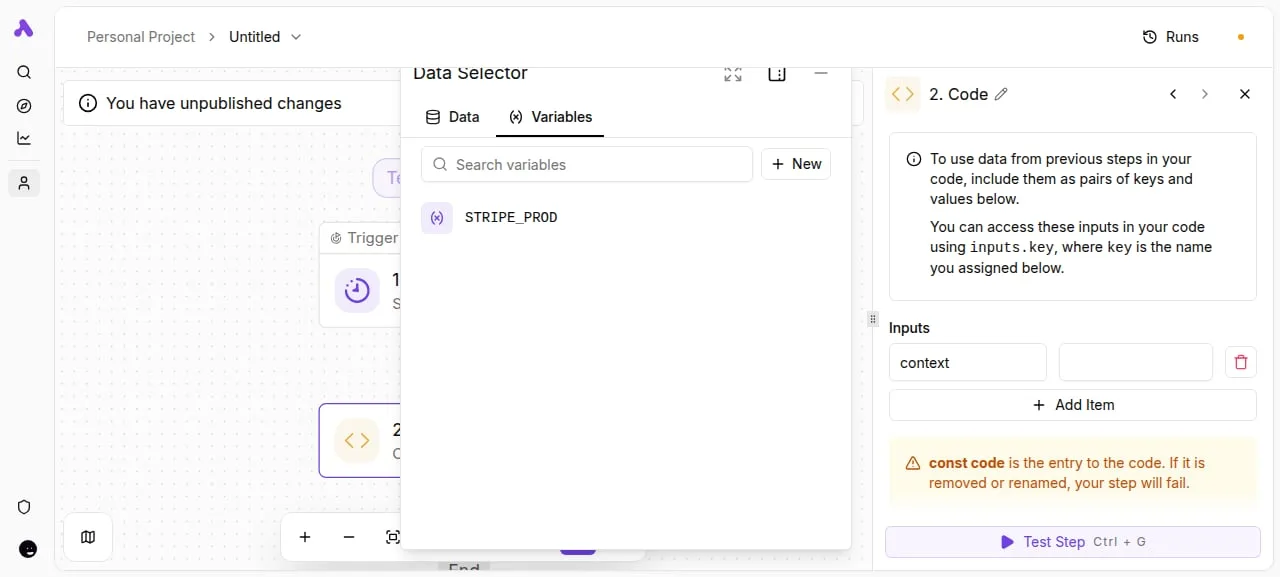
Settings such as limits and identifiers live in one place and the flow reads them, so changing a cap means editing one value, not hunting through steps.
After the model call, the flow can write the usage figures to a log and send an alert when spend for a task type crosses the line you chose. That log is what gives you cost per finished task.
Five steps to cap Haiku 5.5 costs
Start from that log and work through five steps in order, because each one depends on the one before it. Skip the first and every later number rests on a price you can't date.
- Re-check the Haiku 5.5 pricing page and write down the date you read it, so any later bill gap can be traced to a price change or to your own usage.
- Log tokens per finished task for a week, counting retries and failed attempts, so the average reflects real work rather than the happy path.
- Set a spend cap in the provider console, so a runaway loop stops at a number you chose.
- Replay the logged tasks with caching on, then again with batch processing, and keep whichever lowers cost per finished task without breaking your latency needs.
- Put a re-review date on the calendar, since prices, tiers and your own prompts will all drift.
How each step looks depends on the workload, so two examples follow, then the two places the bill most often leaks.
Short as triage replies are, the system prompt and policy text repeat on every call. That repetition is what step 4 tests: if caching works, the repeated prefix gets cheaper, and the saving scales with every conversation.
If your log shows frequent escalations to a second attempt, those count as part of the first task's cost.
For document extraction the input dominates, and nobody's waiting on a screen, so batch is the first thing to test.
The risk is retries on malformed output: a small failure rate across a million pages becomes a large pile of paid-for, unusable tokens. Log it per page, not per attempt.
When a prompt is chatty, the bill rises quietly, because output tokens usually cost more than input tokens. Set an explicit length limit and watch the log for retries. Also record cache misses, because a cache that rarely hits is a discount you aren't getting.
Check which tier your account sits in and what moves you up, since throttling forces retries and retries cost money. If the answer to "what will this cost at our volume" requires a sales call, treat that as a reason to cap harder, not looser.
Frequently asked questions
How much does Claude Haiku 5.5 cost per million tokens?
Read the current rates off the Haiku 5.5 pricing page, where input and output tokens are priced separately; that page is the only place to find them. Copy them into a spreadsheet, then treat them as the smallest input to your budget.
Output length, retries and tool fees move the bill more than a rate difference between models does. If a rate for your volume isn't published and needs a sales call to learn, assume the worst case and cap accordingly.
Is there a free tier for the Haiku 5.5 API?
Is there a free tier for the Haiku 5.5 API? I can't confirm one, so budget as though there isn't.
Even if your console shows starter credit, it covers a prototype, not production. Credits run out at the worst moment, usually when a retry loop or a long-output prompt reaches real traffic.
Test your cost per finished task on the credit, then price the full volume at list.
Does the Batch API change Haiku 5.5 pricing?
To trade speed for a lower rate: that is what batch processing exists for. It's worth checking the pricing page for the current discount on Haiku 5.5.
The discount only helps work that can wait, such as nightly classification, backfills and evaluation runs. A user-facing request that needs an answer now can't use it.
Batch also doesn't fix the underlying math. A bloated prompt or an unbounded output costs more in a batch too, only at a lower rate.
How do I avoid surprise charges on the Claude API? Put limits in before launch, in this order:
- Set a spend limit on the account or workspace, so a runaway job stops itself instead of reaching your invoice.
- Set a maximum output length on every request, since output tokens are the part you control least.
- Cap retries and add backoff, because an unbounded retry loop multiplies the cost of every failure.
- Log tokens, tool calls and retries against each completed task, so you can see cost per finished task instead of cost per call.
- Review the log weekly. A task whose cost drifts upward tells you something changed before the invoice does.
Related reading
References
Running the numbers
See what the same workload costs here.
Free forever plan, and every paid plan self-hosts at no extra cost.
See pricing Talk to sales