
Cloudflare Workers Review: Pros, Cons, Limits (2026)

Nov 12, 202615 min read
Cloudflare Workers is a very good, cheap home for short code that answers a request, and a poor one for long, heavy or stateful jobs. Read the limits before the price, because the limits decide whether the bill ever matters.
Cloudflare Workers Verdict and What It Is
The short verdict
Picture a small team's webhook API: a helpdesk or Activepieces posts an event, your code checks a signature, writes a row and returns a response.
That shape fits Workers well, and it's the thread we follow from first deploy to first invoice.
Find your own job in the left column of the table, then check whether the deciding limit is one you can live with. The table shows which workloads fit and which limit decides each one.
| Workload | Fit | Limit that decides it |
|---|---|---|
| Short webhook or API | Good | Work finishes within a request's CPU budget |
| Edge auth and redirects | Good | Logic is small and stateless |
| Long batch job | Poor | Per-invocation time and CPU ceilings |
| Native-dependency app | Poor | No arbitrary compiled binaries in the runtime |
| Relational-DB app | Poor | Connections are costly from short-lived, distributed code |
If your job sits in a "Poor" row, the cheap headline price won't rescue it.
What Workers runs and how it differs from a server
You deploy a function, not a machine.
Cloudflare Workers is a serverless platform that runs your JavaScript, TypeScript or WebAssembly in lightweight isolates on Cloudflare's network, close to whoever sent the request. There's no server to patch, but also no long-lived process holding memory, files or open connections between requests.
We checked claims on 11 November 2026 against Cloudflare's pricing page, its documentation and its changelog. Where those sources didn't give a figure we could confirm, we left the number out and described the limit in words instead.
Everything below works on Activepieces' free plan. Start without code or a credit card.
Cloudflare Workers Pricing Checked 11 November 2026
You pay for requests plus CPU time, not wall-clock time:
- The free plan stops at a daily cap
- The paid plan keeps running and charges for overage
- Enterprise is negotiated
Since we have no figure we could confirm, the table describes each plan in words.
| Free | Workers Paid | Enterprise | |
|---|---|---|---|
| Base fee | None | Flat monthly fee | By contract |
| Included requests | Daily allowance | Monthly allotment | By contract |
| Included CPU time | Small per-invocation budget | Larger allotment, pooled monthly | By contract |
| Overage, per million requests and per million CPU ms | None, because usage is capped | Metered at both rates | Negotiated |
| Behaviour at the limit | Requests fail until the daily reset | Keeps serving and bills the excess | Set in the agreement |
Read the last row first: Free fails closed and Paid fails open. Pick the plan by which failure you can live with.
When a burst arrives, such as a webhook retry storm after an outage upstream, the free plan's allowance can be gone by mid-morning, and every request after that errors out until the reset.

The allowance is daily, not monthly. For a hobby project that's fine. For anything customers touch, it's an outage you scheduled yourself.
Workers Paid: base fee, included usage, overage
Once you pass the pooled allotments of requests and CPU time that Paid's flat monthly fee adds, you pay per million requests and per million CPU milliseconds.
CPU time counts only while your code is computing, so a Worker waiting on a slow upstream API costs far less than one parsing large payloads. Cheap short handlers stay cheap, and heavy ones are where overage appears.
Costs outside Workers itself: storage and bindings
Check every storage product you bind.
Key-value, object storage, databases and queues are separate line items with their own meters, and the Workers fee covers none of them. A Worker that reads and writes on every request can cost more in storage operations than in compute.
Because our scenario is short, request-shaped code, the bill should be the base fee plus any storage meters it touches. CPU overage appears only if handlers do real computation per request. If the invoice grows, look at the storage lines first.
A Worker that reads and writes on every request can cost more in storage operations than in compute.
Cloudflare Workers Strengths and Hard Limits
Once storage is accounted for, the question left is whether your code fits the box: Workers is strong at short, request-shaped work and hard-limited on CPU time, memory and subrequests.
Where Workers is genuinely strong
A new request rarely waits for a boot, because Workers run in V8 isolates rather than containers. duckdev84's comparison puts Workers cold starts at 2 – 8 ms, against 5 – 15 ms for Vercel Edge and 180 – 450 ms for Lambda running Node.
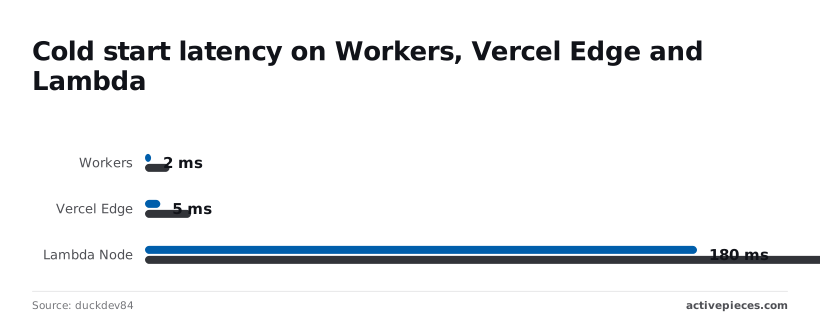
At the top of that range, a webhook receiver or redirect handler on Lambda can spend longer starting than doing its job, while on Workers the start disappears into network latency.
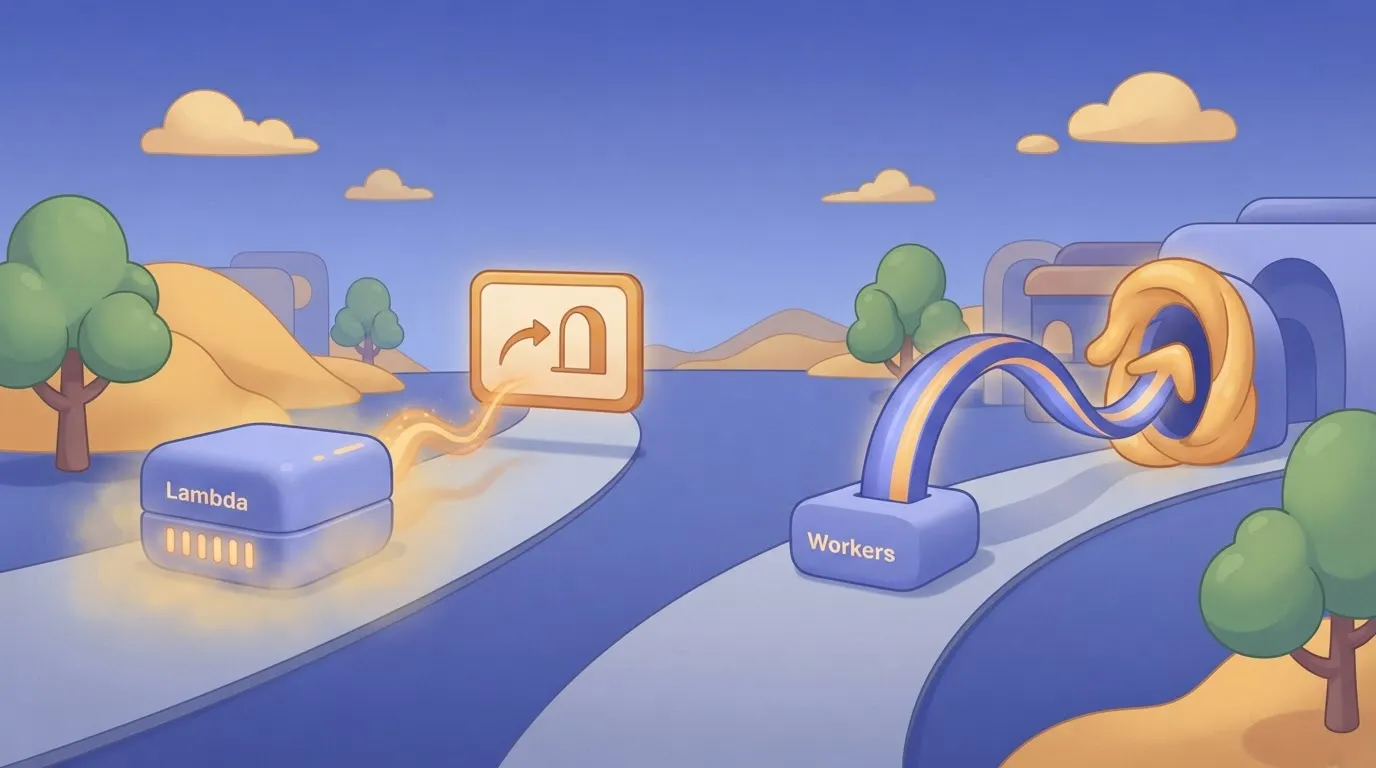
Deploys go to every location at once, bindings attach storage and queues without credentials in your code, and Wrangler handles local runs and releases.
Cloudflare Workers CPU, Memory and Subrequest Limits
Read the limits page before you design anything, because these are enforced, not advisory. Each isolate gets 128 MB of memory, so parsing a large CSV or image in one request fails rather than slowing down.

CPU time is capped per invocation and differs by plan, so a heavy loop gets killed even if the clock time looks small. Subrequests per invocation are also capped, which breaks any fan-out that calls an API once per record.
To get around those limits, you use Queues to split work into batches, Workflows for multi-step jobs that must survive failure, and Cron Triggers for scheduled runs. Each one means rebuilding the job into small integrations.
Cloudflare Workers Node.js Compatibility and Library Gaps
Think of it as a compatibility layer, not Node, even though Node.js compatibility has improved. Libraries that lean on native addons, the filesystem or raw sockets can fail at deploy or at runtime.
Check your dependency list first, since a bundle that exceeds the script size limit fails the same way.
After deploy, some bugs show up that you never saw locally, because local emulation doesn't always match production, and you'll rely on logs and tail output to find them.
Bindings are also the lock-in: code written against them runs only where those bindings exist, so moving off Workers means rewriting the storage and queue calls, not just redeploying.
Easier to see it running than to read about it: set it up free, no card.
Who Should Pick Something Other Than Cloudflare Workers
Choose another platform when your code needs long runtimes, native libraries or a relational database at its center, because Workers' bindings and short limits assume none of those.
Read the table below, which sets Workers beside five alternatives, and the pattern is that only Lambda and a container or VPS stop trading away runtime freedom for proximity to users.
| Platform | Runtime model | Execution limit | Languages | Pricing model |
|---|---|---|---|---|
| Workers | V8 isolates | Short, CPU-bounded per request | JavaScript, TypeScript, WebAssembly | Per request plus CPU time |
| AWS Lambda | Per-function microVMs or containers | Longest of the serverless options | Many, plus container images | Per request plus duration and memory |
| Vercel/Netlify functions | Wrappers over cloud functions | Set by plan | Mainly JavaScript and TypeScript | Bundled in plan, usage overage |
| Deno Deploy | V8 isolates | Short, request-shaped | JavaScript, TypeScript, WebAssembly | Usage-based with plan tiers |
| Fastly Compute | WebAssembly sandboxes | Short per request | Rust, JavaScript, Go | Per request plus compute time |
| Container/VPS | Full OS process | None imposed by the platform | Anything that runs on Linux | Flat or hourly instance |
Read the execution column first. If a job outlives a request, the platform choice is already made for you, and the pricing column only matters among the survivors.
Workloads that should skip Workers
Start with heavy compute, the plainest case. Video transcoding, large report generation or model inference will hit the CPU ceiling, so they belong on Lambda or a container where you set the memory and the clock.
Native dependencies come next. If your code needs an image library, a PDF renderer or a database driver compiled for Linux, an isolate can't load it. A container can.
Put a relational database at the center of the app and the fit gets bad too. Workers reach Postgres or MySQL through connection pooling or an HTTP proxy, and every hop adds latency. A VPS sitting beside the database avoids that.
If you're not a developer, skip it as well.
Suppose a Gmail filter such as from:[email protected] has:attachment should trigger a parse-and-file job. A no-code automation tool will get that running without anyone debugging deploy errors, whereas Workers assumes you'll write and maintain the handler yourself.
Everything else, the short stateless request that wants to run near the user, is where Workers still earns its place.
Where Activepieces Fits Next to a Worker
If you want to move webhook data between business apps without code to maintain, an Activepieces flow with a webhook trigger does it, and the app on the other end is usually already an integration: the community integrations directory of the open source monorepo holds 747, about 60% contributed by the community, under an MIT-licensed core.
Access control, audit logs and release management come with the same product, whether you self-host it or use the cloud, so the glue around your Workers can be reviewed and traced like the rest of your stack.
MoneyGram, Moneypenny, Alan and FundingSocieties run it in production. If a job needs custom logic at the edge, that belongs in a Worker, which the flow can call over HTTP.
Creating workflows with triggers and steps
Think of Activepieces as a workflow automation tool: you build a flow out of a trigger and a chain of steps, and each step talks to an app you already use.
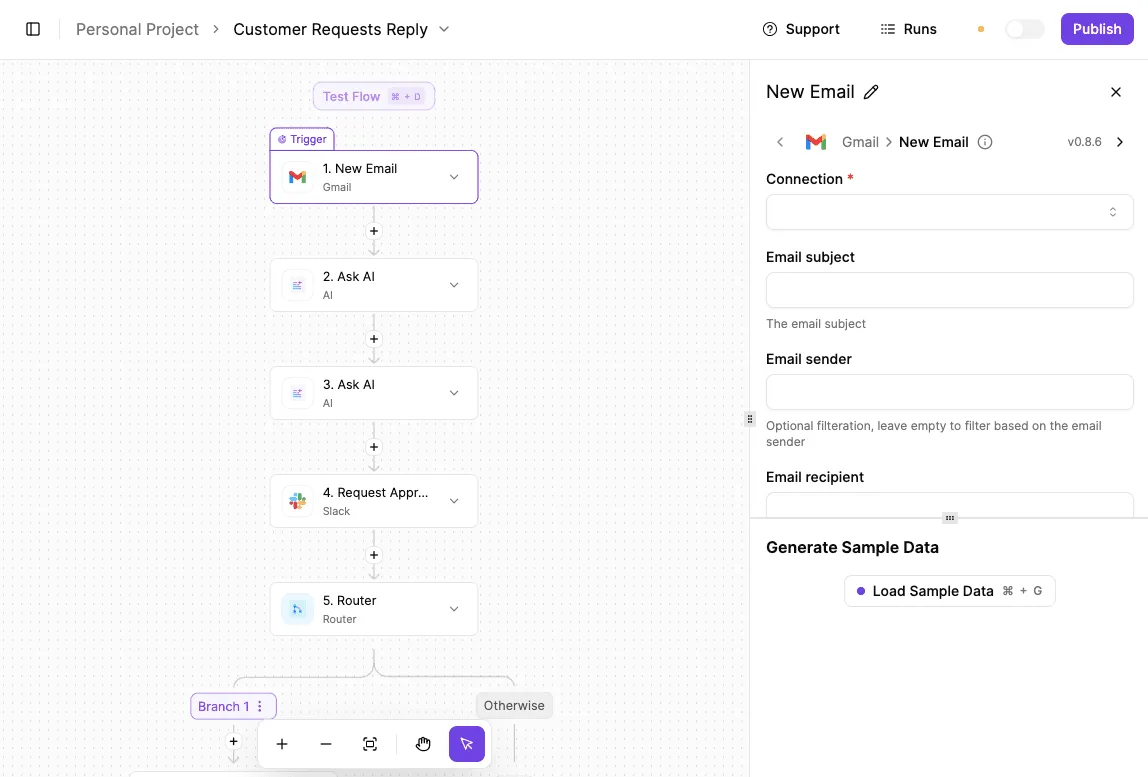
Give the flow a webhook trigger and it gets its own URL. Whatever system posts to that URL starts a run, so a form submission, a payment event or a support-ticket update can fan out to other tools without anyone writing a handler.
For plain "when this happens there, do that here" plumbing, you skip the deploy, the secrets handling and the retry code that a Worker would make you own.
Where a Worker takes over
That convenience stops where your logic gets unusual. Signature checks on an odd header scheme, rewriting a payload before anyone sees it, or deciding in milliseconds which region a request should go to are code problems.
For those, a Worker is the right home, and it sits well beside a flow rather than inside it.
The flow makes an HTTP request to the Worker, the Worker does its narrow piece of work and returns a response, and the flow carries on with the result.
A separate Worker sits to the side with an HTTP arrow going out from the flow and a response coming back.
Read it as a division of labor. The flow owns the sequence and the app connections, and the Worker owns only the one step that needs real code.
What the diagram doesn't show is Activepieces replacing Workers hosting. It doesn't run your edge code near users, and it's not a place to put a long-running or stateful job. It's a way to avoid writing glue.
That split keeps your own code small. You maintain a few short, request-shaped functions, which is what Workers handles well, and leave the app-to-app wiring to a tool built for it.
A Monday Checklist Before Committing to Workers
Run six checks in order, and you'll know whether Workers fits your jobs before you've moved anything. They test the same short, request-shaped functions you decided to keep against the platform's real limits instead of its price.
- First, pull request counts from your current logs, then time the function's actual compute, not its total duration. Time spent waiting on another service's reply isn't the same as time spent computing, and the limits care about the second one. If you can't say how long a typical request computes, you can't yet say what the bill or the limits will do to you.
- Second, compare both numbers to the documented limits. Read the current limits page for the plan you would use, and write the figures next to your own estimates. Check the worst request, not the average, because one heavy payload that gets cut off mid-run is the failure your customers will report.
- Third, prototype on the Free plan. Deploy one real function and send it real traffic samples. The free tier is enough to show whether the code runs at all, and it costs you nothing when the answer is no.
- Fourth, remember that Workers isn't a full server environment, so a dependency that expects a file system or a particular runtime can fail only after deployment. Import every package you rely on during the prototype, not after you've rewritten half the codebase around it.
- Fifth, set usage alerts before moving to Paid. A retry loop or a misbehaving upstream sender can multiply requests overnight, and a cheap per-request rate turns into a surprise invoice by morning. An alert on request volume tells you while it's still a small problem.
- Sixth, decide in advance where long, heavy or stateful work goes, whether that's a conventional server or a queue-fed worker elsewhere. If the answer is "we'll figure it out," that job is your real constraint.
Finish all six and you hold a short written verdict per function: fits, fits with changes, or belongs elsewhere.
Frequently asked questions
Is Cloudflare Workers really free to use?
For a prototype, a webhook receiver or a low-traffic redirect service, the free tier is enough. It's capped, so a busy production app will outgrow it.
Treat the free tier as a way to test whether your function fits the runtime, not as a plan for production.
Past the caps, requests are refused or you move to a paid plan, and you want to learn which of those applies before a traffic spike teaches it to you.
Can Cloudflare Workers replace a traditional backend server?
It can replace the request-and-response part of one, and for many apps that's most of the backend. It can't replace a long-running process, a job that holds large amounts of memory, or anything that expects a local disk and a persistent connection to a database.
If your verdict from the earlier checklist was "fits with changes," the usual change is moving state out to a storage or database service and keeping the Worker as a thin, fast front.
If the job is a nightly batch or a video transcode, it belongs on a server or container instead.
Does Cloudflare Workers support Python?
Yes, in a limited form: Python Workers exist, but JavaScript and TypeScript are the native languages, and the runtime is built around them. So a Python function isn't a straight copy-and-paste job.
Check every library you import, because packages that depend on native extensions or heavy startup are the likely failures.
If your code is a Python data-processing script, assume it needs a different home. If it's a small handler with few dependencies, test it early.
What happens when a Worker exceeds its CPU time limit?
When a Worker runs past its CPU limit, the platform stops the invocation, and the caller gets an error rather than a result.
The limit applies to CPU time, not to time spent waiting on a fetch or a database reply. A Worker that mostly waits on other services can run well, while one that computes for too long fails.
Practically, that means you should log failures and look for the pattern. If the same route keeps hitting the limit, the work is the wrong shape for Workers, and trimming it only delays the move.
Is Cloudflare Workers cheaper than AWS Lambda?
For short, request-shaped code with a lot of traffic, it's often cheaper, but the headline price isn't the deciding number.
Lambda is the better fit when a function needs more memory, longer runs or deep ties to other AWS services. In those cases a lower per-request price doesn't help if the code can't run.
Compare the two using your own function's duration, memory and traffic, and count the cost of any rework needed to fit the Workers limits.