
Cohere API Trial Key, Rate Limits and Pricing in 2026

Nov 12, 202615 min read
The Cohere API is Cohere's hosted interface for text generation, embeddings and reranking. You sign up, create a key in the dashboard, and send an authenticated HTTPS request, whether from your own code or from a workflow tool such as Activepieces.
The Cohere API is a key-authenticated HTTPS service that lets developers call Cohere's language models for generation, embeddings and reranking, with usage governed by per-endpoint rate limits and billed per token.
New from Cohere: Model Vault
Cohere also sells Model Vault, a dedicated, fully managed platform for running its models on isolated infrastructure, priced by the GPU your model runs on and the number of replicas rather than per token. It suits teams that need guaranteed performance with no shared resources.
| GPU type | Price | Unit | Note |
|---|---|---|---|
| L4 24GB | $1.00 promotional (on-demand $3.00) | Hourly, per GPU | Promotional price through March 31 '27 |
| A100 80GB | $2.25 promotional (on-demand $3.50) | Hourly, per GPU | Promotional price through March 31 '27 |
| H100 80GB | $4.25 promotional (on-demand $6.25) | Hourly, per GPU | Promotional price through March 31 '27 |
| H200 141GB | $5.50 promotional (on-demand $7.25) | Hourly, per GPU | Promotional price through March 31 '27 |
| B200 192GB | $8.00 promotional (on-demand $9.75) | Hourly, per GPU | Promotional price through March 31 '27; reserved capacity available via sales |
If you are running this arithmetic for your own team, see what the same workload costs on Activepieces.
Getting your Cohere API key and first call
What the Cohere API is
One key reaches several endpoints:
- chat for generation
- embed for vectors
- rerank for reordering search results
If your prototype only chats, it tells you nothing about how embedding a corpus will behave, because Cohere meters and limits each endpoint separately.
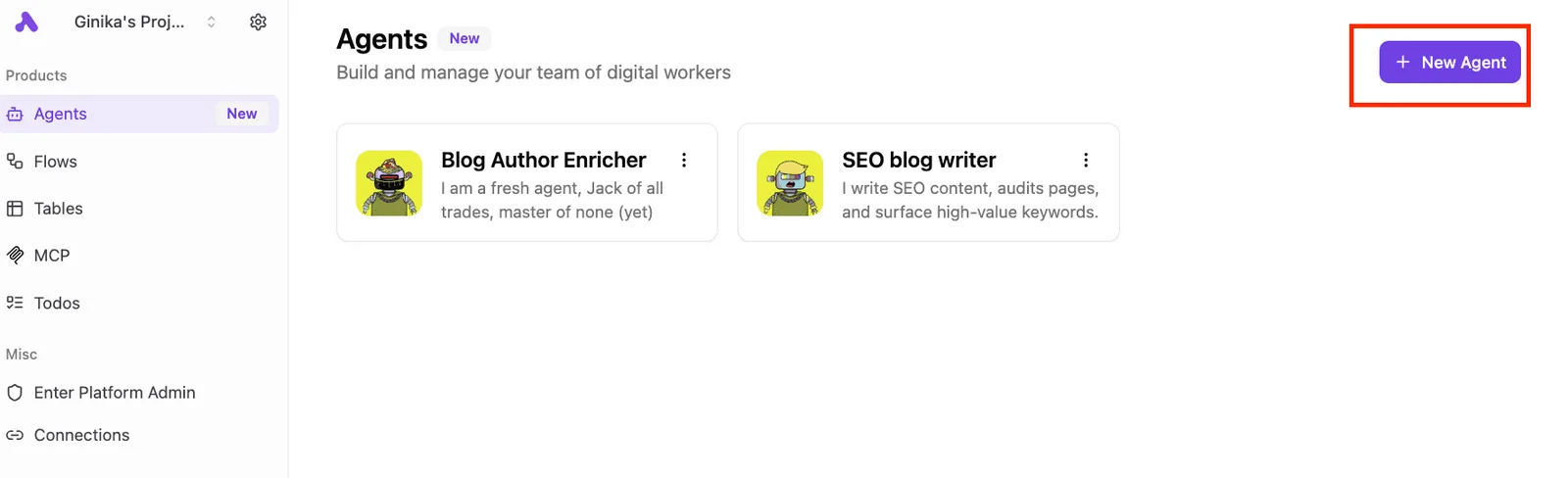
Activepieces agents, such as a blog enricher and an SEO writer, each make the same kind of Cohere call behind the scenes, and if they share a key, they share its limits.
If your prototype only chats, it tells you nothing about how embedding a corpus will behave, because Cohere meters and limits each endpoint separately.
Decide now where the key lives and what it's allowed to do, because every agent you add is another caller on that key.
Trial keys versus production keys
You get a trial key free on signup. It's rate-limited, and Cohere's terms restrict it to non-commercial use, so a demo running on one is already outside the agreement if it serves customers.

Cohere bills a production key per token, and you create it separately in the dashboard. Keep one key per environment and store each in an environment variable or secret manager, never in the repository.
curl https://api.cohere.com/v2/chat \
 -H "Authorization: Bearer $COHERE_API_KEY" \
 -H "Content-Type: application/json" \
 -d '{"model": "'"$COHERE_MODEL"'", "messages": [{"role": "user", "content": "Say hello."}]}'
import os, cohere
co = cohere.ClientV2(api_key=os.environ)
response = co.chat(
model=os.environ,
messages=[{"role": "user", "content": "Say hello."}],
)
print(response.message.content[0].text)Set COHERE_MODEL to a chat model name from Cohere's model list.
Read the reply text from message.content. The usage object beside it reports billed_units with input and output tokens, and those are the quantities on your invoice. Log them from the first request, so a cost surprise has a timestamp attached.

Cohere models and endpoints available
Sort the models into three endpoint families first: Chat for generation, Embed for vectors and Rerank for ordering results. Each meters a different unit, so your usage log needs to record which endpoint spent what.
Read the input and output columns first: Cohere counts a Chat call in tokens and a Rerank call in documents scored, which makes a per-token estimate wrong for any pipeline that includes both.
| Endpoint | Models | Purpose | Input unit | Output unit | Context window and max output | Deprecation note |
|---|---|---|---|---|---|---|
| Chat | Command A, R+, R, R7B | Text generation, tool use, conversation | Tokens | Tokens | Differs per model; read it from each model's docs page | Command A is the newest of the four; check the changelog before building on the others |
| Embed | Embed 4 | Vectors for search and retrieval | Text or images | A vector per input | Set by the model page; output is fixed-size vectors | Confirm in the changelog before pinning |
| Rerank | Rerank 3.5 | Reordering candidate results | A query plus a list of documents | A relevance score per document | Set by the model page | Confirm in the changelog before pinning |
Prices and plan limits checked against docs.cohere.com on October 17, 2026.
Start with Command A; R+, R and R7B are the earlier Command R family. Pick one and test your longest real prompt against it, because the context limit is where a prototype that passed on short inputs fails first.
Embed 4 turns text or images into vectors. Vectors from different models aren't interchangeable, so changing the model means re-embedding everything you have stored.
Once your search has returned its candidates, Rerank 3.5 takes the query and those candidates, then scores each one. It sits after retrieval, not in place of it.
Read the changelog before you pin a model name, and again before each release. Cohere announces retirements there, not in the model list, and a retired name returns errors from the first request after the cutoff.
Cohere API pricing per token and per search
Command R costs $0.15 per million input tokens. A model name that survives a retirement can still change what you pay, so check Cohere's pricing page as well as the model list (checked October 2026).
Price table by model and endpoint
You can't cover a pipeline with one budget number, because the table shows that Cohere bills by different units per endpoint. Take from it that rerank is priced per search, not per token.
| Model | Input $/1M tokens | $ per 1K searches | Trial vs production |
|---|---|---|---|
| Command R | 0.15 | n/a | Both; trial is rate-limited |
| Command R7B | 0.0375 | n/a | Both; trial is rate-limited |
| Embed 4 (text) | 0.12 | n/a | Both; trial is rate-limited |
| Rerank 3.5 | n/a | 2.00 | Both; trial is rate-limited |
At $0.15 per million input tokens, Command R is the cheapest mid-tier input price in the LLM Pricing Calculator chart, so teams focusing on mid-tier cost know where their baseline is.
Mistral Large 4 is $0.68, Gemini 3.8 Flash $0.75 and Claude Sonnet 5.5 $2, making each model choice a direct cost decision, which means you can't afford to experiment with the expensive options once in production.
Command R is therefore about a quarter of Mistral's price.
Say a support tool sends 200 million input tokens a month. On Command R that's 200 × $0.15 = $30. The same volume on Claude Sonnet 5.5 is 200 × $2 = $400. Output tokens come on top, so treat $30 as the floor.
100,000 searches cost $200 at $2.00 per 1,000, more than six times the Command R input bill above. A chat that resends its full history each turn also multiplies input tokens, so the per-turn figure understates the monthly one.
Worth checking against a plan that does not meter every step: one credit covers a whole run on Activepieces.
Cohere API rate limits by key type
Beyond tokens there is a second meter, requests per minute. A production key lifts Chat from 20 to 500 while leaving Embed text at 2,000 on both key types.
Trial key limits
On a trial key, Chat allows 20 requests per minute, according to Cohere's rate-limit docs (checked 2026-10-17). That's one request every three seconds, so a demo with many people clicking at once will start failing.
Rerank is tighter at 10 per minute, and a search page that reranks on every keystroke exhausts it in seconds. Tokenize allows 100.
Over the limit, you get an HTTP 429 error, not a slow response, so code without retry logic fails visibly.
Production key limits
Move to a production key and Chat rises to 500 per minute, Rerank to 1,000 and Tokenize to 2,000. Those are 25, 100 and 20 times the trial figures.
You request production access from the Cohere dashboard, and it's billed per token, so the cost question from the previous section starts applying at the same moment.
Per-minute limits versus monthly caps
Look at the table: Embed text is unchanged between key types and Embed images jumps from 5 to 400.
| Endpoint | Trial per minute | Production per minute | Monthly trial cap |
|---|---|---|---|
| Chat | 20 | 500 | 1,000 calls |
| Embed text | 2,000 | 2,000 | 1,000 calls |
| Embed images | 5 | 400 | 1,000 calls |
| Rerank | 10 | 1,000 | 1,000 calls |
That is why the 1,000-call monthly cap is the one that stops a project quietly. Treat both numbers as constraints when you write the retry wrapper.
Handling common Cohere API errors
Expect a handful of failures to account for almost everything the Cohere API will return, and only three are worth retrying: 429, 5xx and timeouts.
- A 401 means the key is missing or wrong. Fix the key and don't retry.
- A 400 means the input is invalid or too long. Truncate or split it and don't retry the same payload.
- A 429 means you hit a rate limit. Retry with exponential backoff and jitter.
- A 5xx means the failure is on Cohere's side. Retry.
- A timeout means no answer arrived in time. Retry.
For a 401, check the key before anything else, and check which key your deployment loaded. A trial key pasted into a production config is a common cause.
A 403 means the key is valid but not permitted to do what you asked. Neither error will clear on its own, so fail loudly.
If you get a 400, it usually comes from over-length text. Truncate or split documents before sending, and send Embed requests in batches rather than one oversized list.
On a 429, wait, then try again, doubling the delay and adding random jitter so parallel workers don't retry in lockstep. Log token usage per request and set budget alerts, so a limit or a bill never arrives as a surprise.
5xx errors and timeouts
Server failures are rare. APIdown records 100% monthly uptime for Cohere from October 2025 through February 2026, which means a month with no measurable outage is the norm.
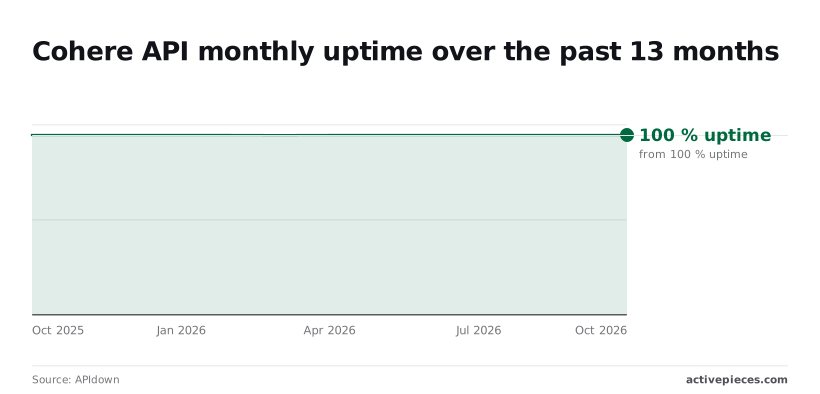
March 2026 came in at 99.976%, roughly eleven minutes of downtime, so even the bad month was short.
Retry these, but spend your care on 429 and 400 handling, where failures are far more likely to be yours.
Calling the Cohere API from automated workflows
You can make Cohere calls for embedding, classifying or summarising from a workflow builder without running a service, but it adds nothing to Cohere's limits. Your 429s arrive exactly as they would from code, so the same handling applies.

When to use workflows for Cohere API tasks
Three jobs suit a workflow: embedding each new document as it lands, classifying inbound email, and summarising support tickets, so a single unified approach can handle all three.
Each is event-driven and low volume, and each is a single request with a small amount of glue around it.
A webhook receives the event, a step calls Cohere, and a later step writes the result somewhere. You skip deployment, a process to keep alive and a scheduler to maintain.
Keep the API key in a stored connection rather than in a script, so it stays out of the workflow's own configuration and out of anyone's copy of it.
That matters on a trial key, which you'll want to swap for a production key without editing every step.
Activepieces runs these steps on your own provider key, so the $0.15 per million input tokens for Command R is billed on your Cohere account at Cohere's rate, not at a resold one. MoneyGram, Moneypenny, Alan and FundingSocieties run it in production.
Bring-Your-Own-Key availability is listed tier by tier on the Activepieces pricing page, next to unlimited flows on every plan, free included, so you can set that rate against what a platform charges when it resells its own model and compare the two line by line.
Once sustained throughput is the point, such as bulk re-embedding a whole archive, code is the better tool. There you control concurrency yourself, and a workflow's per-run overhead becomes the bottleneck.
Retries and pacing against rate limits
Start with the builder's retry setting, the cheapest place to handle failures, and put it on every step that calls Cohere. The screenshot below shows the shape of it using a placeholder action from an ice cream catalogue service, Gelato, rather than Cohere.
Look at the right-hand panel: the selected step carries its connection, a "Continue on Failure" option and an "Auto Retry on Failure" option. Those two switches decide whether a rate-limited call retries or whether the run dies or carries on with an empty result.
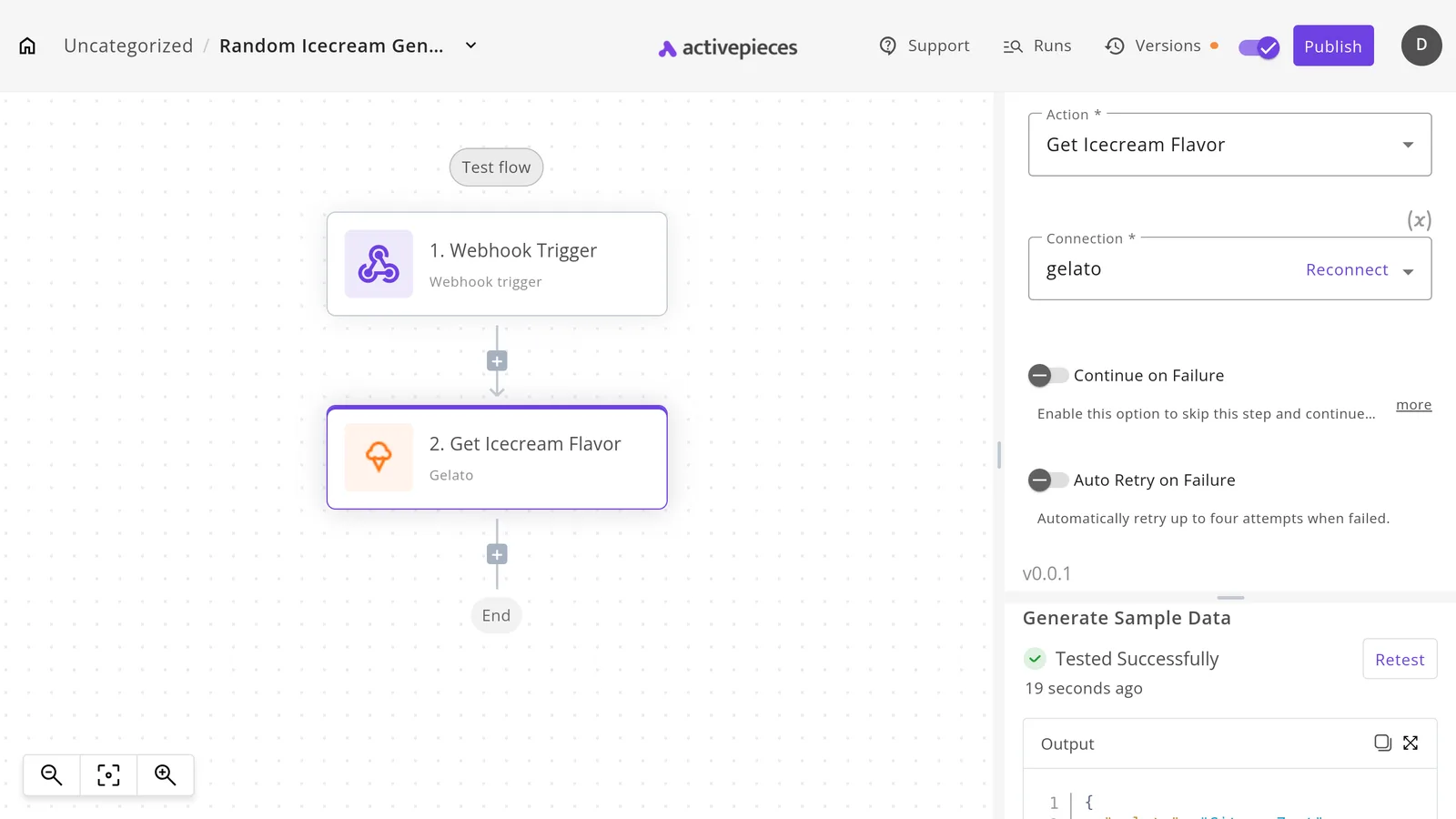
Leave "Continue on Failure" off for Cohere steps. A silently skipped classification writes nothing, and you find out from a customer rather than a log.
Automatic retry only repeats a request. It doesn't pace the workflow behind it, so if many events arrive together, queue or space them yourself before they reach the Cohere step.
Preparing your Cohere API key for production
Beyond pacing your own traffic, six steps, in this order, keep the trial key's limits and per-token billing from surprising you in production, before taking it live, so you discover your actual cost structure during the trial, not after launch.
- Create a key: use the trial key from the dashboard and treat it as a test credential. Anything built on it is a prototype by definition.
- Run the minimal request: send one short prompt and read the whole response, including the token counts it returns. Those counts are what you will be billed on.
- Estimate monthly cost from the pricing table: multiply expected requests by average input and output tokens, using the separate rates for each.
- Add backoff and usage logging: retry rate-limit errors with a growing delay and a ceiling, and log tokens per call and per endpoint. Limits apply per endpoint, so without that log you can't tell which one is throttling you.
- Request production access before launch, while you still have time to wait for an answer.
- Set a spend alert, because pricing is per token, so a retry loop or a runaway batch bills you silently.
Frequently asked questions
Free means a trial key only, which costs nothing but is rate limited and meant for evaluation. Once you need steady traffic, you move to a production key billed per token.
Build your retry handling against the trial limits, because that's where you will meet them first.
A trial key can't go into a commercial product. Cohere's terms restrict trial keys to prototyping and non-commercial use, so shipping one inside a paid product puts you in breach of the terms and on the lowest limits.
Create a production key from the dashboard before launch, and keep the two keys in separate environment variables so a test script never runs on billed credit by accident.
How do I get higher Cohere API rate limits?
Move from a trial key to a production key, which carries higher per-endpoint limits. If those are still too low, contact Cohere sales about a custom arrangement.
Limits are set per endpoint, so a chat workload and an embedding workload hit different ceilings. Check the rate limits page in the docs for the endpoint you actually call, and watch the usage view in the dashboard to see how close you run.
Whether Cohere uses your API data to train its models depends on your plan and on whether you have opted out, so check the current data usage policy and your dashboard settings. Don't assume either way.
If your prompts contain customer data, get the answer in writing from Cohere's terms or your account contact before the first production request, not after.
Can I use Cohere models through a cloud provider?
Yes. Cohere models are offered through several major cloud platforms, including Amazon Bedrock, the managed model service from Amazon Web Services. Billing, quotas and error behavior then follow the provider's rules rather than Cohere's own API.
Your retry logic needs to handle that provider's throttling responses, and the limits you tuned against Cohere's direct API will not carry over unchanged.
Related reading
References
Running the numbers
See what the same workload costs here.
Free forever plan, and every paid plan self-hosts at no extra cost.
See pricing Talk to sales