
Employee Offboarding Automation: A Complete Guide for 2026

Nov 14, 202615 min read
Automated employee offboarding is the programmatic revocation of user permissions and the archival of their data across all enterprise systems without manual intervention. It's the standard for modern IT.
By configuring a zero-touch exit process in Activepieces, an administrator ensures that a termination event in the source of truth triggers an immediate, verifiable sequence of API calls to close every open door.
Automate employee offboarding in fifteen minutes
The gap between manual checklists and automated workflows
When an IT manager follows a document to revoke access to GitHub, they may miss the specific repository permissions granted to a contractor.
This is the danger of manual offboarding; it relies on human memory and the consistent execution of a static checklist. That leaves a back door into the codebase.
By treating every permission as a line item in a script that the system can't skip, automated flows bridge this gap.
While a human might delay deactivating a user in Slack until the end of the business day, an automated flow executes the lockout the moment the HR record updates.
This transition from "best effort" to "event-driven" execution eliminates the window of opportunity for disgruntled ex-employees to export sensitive information.
The core stack: HRIS, Identity Provider, and IT Ticketing
A reliable offboarding architecture requires a three-tier synchronization between the system of record, the gatekeeper of credentials, and the audit log.
- Human Resources Information System (HRIS): Tools like HiBob or Workday act as the trigger. They signal the exact second an employment contract ends so the automation knows when to start.
- Identity Provider (IdP): Services such as Okta or Microsoft Entra ID are the central kill-switch. They disable single sign-on (SSO) sessions to immediately block entry to integrated cloud apps.
- IT Ticketing System: Platforms like Jira Service Management or Zendesk create the permanent record of the offboarding. They provide the signed manifest required for SOC2 compliance audits.
80% of IT leaders view improper offboarding as a security threat, yet only a little over half of organizations actively monitor their offboarding efficiency, leaving a significant portion of the workforce vulnerable to undetected access risks.
This oversight results in one-fifth of companies experiencing a breach directly tied to a former employee's active credentials.
An open-source automation engine addresses this by shipping an MIT-licensed core, allowing IT to clone the repository and trace the queue and worker architecture before running it self-hosted or air-gapped. Verified evidence in the codebase closes these reviews faster than a vendor's promise ever could.
The following section details how these components interact to form a hardened exit pipeline.
This takes minutes, not a project: automate it in Activepieces free.
Building your offboarding workflow
The process begins with an automated trigger that watches your HRIS for status changes and executes a sequenced revocation of identity and data access.
By using a visual automation builder, you move from a checklist of manual clicks to a logic-driven sequence that verifies every account closure.
Stage 1: Setting the HRIS trigger to fire on termination date
When you add a "New Row" to Google Sheets or a "Webhooks" trigger receives a payload from an HRIS like HiBob or Workday, the workflow initiates.
This trigger must capture the employee’s primary email address so the subsequent steps have a unique identifier to target across your software stack.
Automated event detection
True automation requires an event-driven trigger rather than a human-initiated one. While a "New Row" in a spreadsheet is a common way to log data, the workflow should ideally use a webhook or a polling service that monitors your HRIS for status changes.

This ensures that the moment a record is updated, the automation fires without a person needing to click a button.
The spreadsheet example is simply one way that HRIS data might be piped into your workflow. By relying on an automated polling or webhook event, you achieve the immediacy required to close security gaps.
This eliminates the lag time between a termination meeting and the IT department receiving a ticket.
Stage 2: Suspending Google Workspace and Microsoft 365 accounts
To revoke active sessions immediately, the automation calls the "Suspend User" action in Google Workspace and the "Update User" action in Microsoft 365 once the trigger fires.
This specific state change is safer than a full "Delete User" action because suspension preserves the user's data for legal discovery while blocking all new login attempts.
Ownership of all documents transfers to the user's manager via the "Move File" action in Google Drive following the suspension. This prevents "orphaned" files from becoming inaccessible to the remaining team.

HRIS vs spreadsheets as source of truth
It is critical to distinguish between your data source and your logging tools. Your HRIS, such as Workday or HiBob, serves as the primary source of truth for employment status.
While the steps below mention Google Sheets, the spreadsheet acts as a secondary log or a simple data relay for the automation, not the master record.
The automation should always look to the HRIS for the authoritative signal. Using a spreadsheet as a middle-man is helpful for visibility, but the security of the flow depends on the integrity of the data coming directly from your HR management platform.
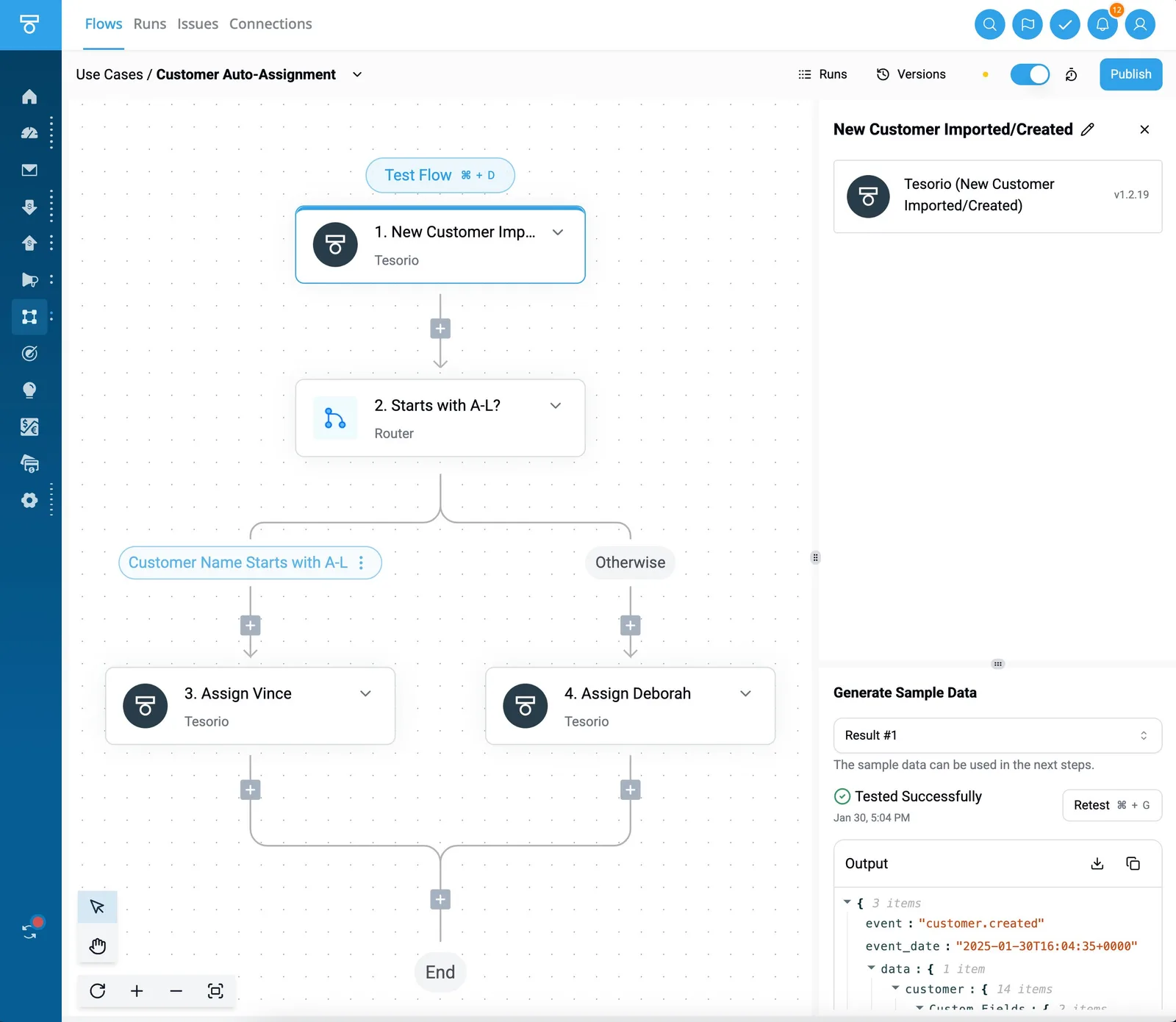
- Set Trigger: Select the HRIS webhook or polling event to monitor your termination log.
- Revoke Access: Use the Google Workspace "Suspend User" action to lock the account.
- Archival: Use the Google Drive "Move File" action to transfer assets to the Manager's folder.
- Notification: Use the Slack "Send Message to Channel" action to alert the #security-logs channel.
Logging offboarding actions to Slack audit trail
In the final stage, the Slack "Send Message to Channel" action posts a completion receipt to a private #security-logs channel. This message should include the timestamp and the specific email address processed, providing a real-time audit trail that proves the revocation logic executed as intended.
The automation builder catches the error if a step fails, such as a service API being down. This allows you to route a high-priority alert to the on-call engineer rather than letting a live account remain active and unnoticed.
Comparing automation platforms for secure employee exits
Selecting an automation platform for offboarding requires balancing the ease of use for HR staff against the strict data residency requirements of the IT department.
While many tools can connect a directory service like Google Workspace to a project management tool like Trello, the distinction lies in where your employee data lives and how much you pay to keep it there.
The following table compares the primary contenders based on their current pricing tiers and accessibility for non-technical users:
| Platform | Entry Price | Enterprise/High-Volume Cost | Ease of Use for HR |
|---|---|---|---|
| Zapier | ~$20/mo | $20,000+ per year | High (Drag-and-drop) |
| Make | ~$9/mo | ~$120/mo | Medium (Visual bubbles) |
| Activepieces | $0 (Self-hosted) | Custom / Usage-based | High (Linear flows) |
A company scaling its headcount will face a steep tax just to maintain basic security workflows due to the significant jump in Zapier’s enterprise pricing.
Make offers tiered monthly plans, so a small firm can choose a lower-cost tier (such as the one around $9/mo) that fits its typical termination volume rather than paying a flat enterprise rate.
Zapier: The fastest path for non-technical HR managers
By using a linear, step-by-step interface that requires no understanding of JSON or API structures, Zapier allows HR managers to build workflows.
This accessibility ensures that the person closest to the personnel file (the HR Generalist) can personally verify that a "Suspend User" action is pointed at the correct account.
Zapier operates as a black box. You can't inspect the underlying execution environment, which means you're trusting their SOC2 report rather than your own infrastructure logs.
Make: Best for complex data mapping and conditional logic
Make provides a visual canvas for building multi-branch scenarios, such as checking if a departing employee is the sole owner of a board in Monday.com before deactivating their login.
This prevents "orphaned" resources that stop a team’s work, but the interface uses technical terminology that often requires an operations specialist to configure.
Make allows for advanced data manipulation. It's the preferred choice when an offboarding flow must transform raw data between incompatible systems without manual cleanup.
Activepieces: The choice for privacy-conscious IT departments
Activepieces runs the offboarding engine on your own infrastructure under an MIT-licensed core, ensuring that sensitive employee PII never leaves your network.
By running the automation behind your firewall, you eliminate the risk of a third-party data breach exposing your internal termination logs.
Activepieces syncs flows to git and promotes them through Release Management, moving logic from a test environment to production as a versioned, reviewed artifact.
Check the documentation for Git Sync and Release Management to see how separate projects make promotion a deliberate step rather than an accidental click.
You can follow the rest of this with the builder open. Start free, no card.
Fix common offboarding automation errors
Manual delays in the offboarding chain don't just create security holes; they generate compounding daily invoices from regulatory bodies and logistics providers.
Dickerson-group identifies that failing to revoke access or notify benefits providers immediately triggers specific, non-negotiable penalties.
Manual delays in the offboarding chain don't just create security holes; they generate compounding daily invoices from regulatory bodies and logistics providers.
These scale with every 24-hour window the task remains on a human to-do list: COBRA Non-compliance ($100/day), CHIPRA Penalties ($137/day), International Device Retrieval ($399+), and Form 8928 Late Filing ($525), meaning that administrative delays rapidly compound into substantial financial liabilities.
The immediate fiscal consequence of a broken or stalled workflow is represented by these costs. To avoid these hits, the automation must be resilient enough to handle the three primary technical failure points that stop a script before it finishes.
Handling API rate limits in Google Workspace and Slack
When the automation engine sends too many requests to a service provider within a fixed window, API rate limits occur, causing the provider to temporarily block further actions.
In a bulk offboarding event, such as a seasonal contract end, sending simultaneous "Suspend User" commands to Google Workspace and "Deactivate User" commands to Slack can exceed the per-second quota of the respective platforms.
To resolve this, the workflow must include a delay or "sleep" step between individual account revocations so that the request volume stays under the provider's threshold.
Fixing Google Workspace super admin 403 errors
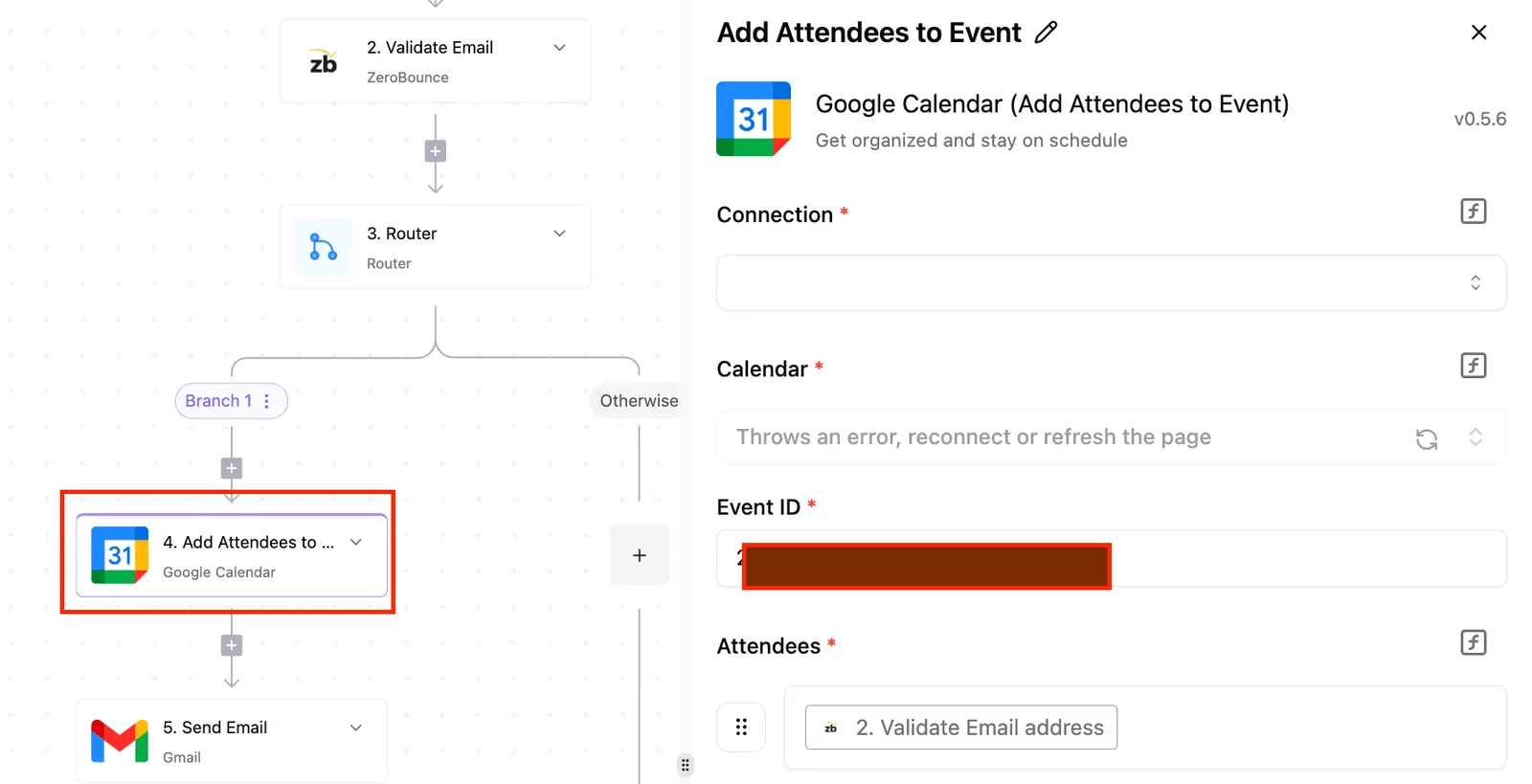
If a script tries to suspend a Super Admin in Google Workspace using a standard administrative token, the API will return a 403 Forbidden error.
Automation workflows often fail when they attempt to modify a user who holds a higher privilege level than the service account running the task.
This happens because the security model prevents lower-level accounts from affecting top-tier principals.
Configuring a "catch" branch in the logic flags these specific accounts for a manual secondary approval by a remaining Super Admin. This ensures the automation doesn't simply crash when it hits a protected identity.
What to do when the automation fails halfway through
A fragmented security perimeter is created when a partial failure leaves a former employee with active access to some systems while the system closes others.
To manage this, the builder must implement a state-tracking mechanism (typically a row in a Google Sheets log or an entry in a specialized database) that marks each individual step as "Complete."
If the process halts due to a network timeout, the system can reference this log to resume from the exact point of failure. This is better than attempting to re-run the entire sequence and triggering duplicate errors.
First automated exit checklist
A successful automated offboarding deployment requires a verifiable audit trail that proves you closed every high-risk access point according to your security policy.
While the automation handles the repetitive API calls, the human operator must validate the integrity of the handshake between the builder and the target service.
This initial validation ensures that the logic you inspected in the source code actually translates to revoked permissions in production.
The following sequence establishes the baseline for a secure, automated exit:
- Verify API Key permissions to ensure the automation possesses the minimum scoped rights required to suspend users without gaining full administrative control over the entire organization.
- Run a 'Dry Run' with a test account to confirm the logic branch for "Suspension" vs "Deletion" executes correctly before affecting live employee data.
- Confirm Manager-owned shared drive access by checking that Google Drive permissions have been transferred to a supervisor rather than being orphaned or deleted.
- Export the first audit log for compliance to provide a signed record of exactly when and how access was severed for internal or external auditors.
This checklist transforms the offboarding process from a series of "best effort" manual clicks into a repeatable, defensive artifact.
By starting with these specific validation steps, you eliminate the risk of a silent failure where the automation reports a success while the underlying service remains accessible.
Once the first log is exported and verified, the focus shifts to maintaining the health of the automation environment itself.
What Activepieces does about this
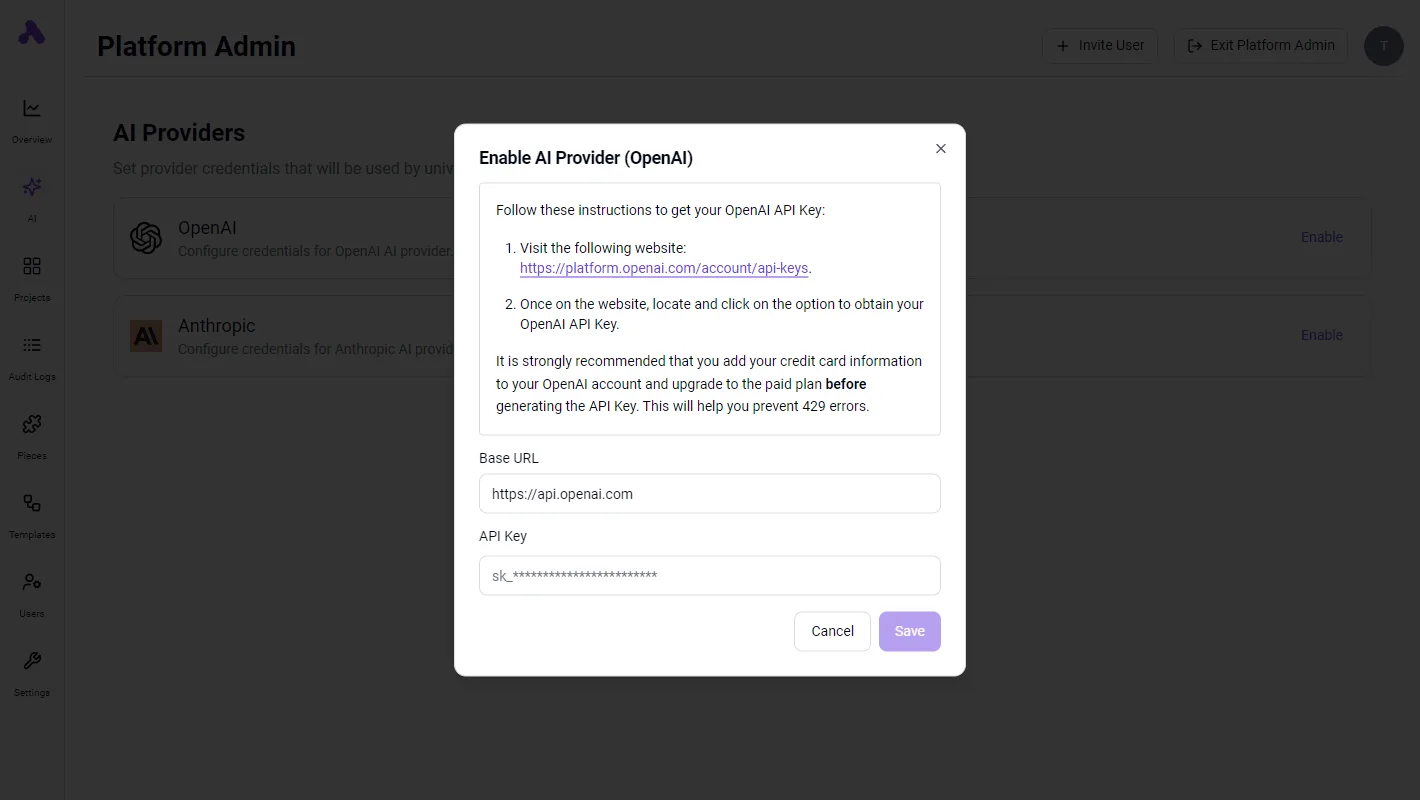
Activepieces provides the open-source infrastructure to turn offboarding from a black-box vendor process into a transparent, self-hosted security asset. By using the MIT-licensed core, IT teams can inspect every line of the revocation logic to ensure that sensitive employee PII never leaves their private network.
This architecture allows organizations like those in the healthcare or financial sectors to run their automation behind a firewall or in an air-gapped environment, satisfying the strictest data residency requirements while eliminating the risk of a third-party breach exposing internal termination logs.
The platform specifically addresses the "black box" problem by allowing you to sync flows to Git and promote them through a formal Release Management cycle.
This means your offboarding logic is treated as versioned code; a senior engineer can review the API calls to Google Workspace or Okta before they are deployed to production.
This prevents the "accidental click" errors common in purely cloud-based builders and ensures that the revocation sequence is a deliberate, audited artifact that matches your internal security policy.
To handle the complexity of modern enterprise stacks, Activepieces uses a linear, logic-driven builder that connects to over 100 apps, including HRIS triggers like HiBob and identity providers like Microsoft Entra ID.
If a specific revocation step fails (such as a service API being down during a bulk offboarding event) the platform’s built-in error handling routes a high-priority alert to your on-call team.
This ensures that no account remains active and unnoticed, providing the verifiable evidence required to close SOC2 and GDPR audits faster than a vendor's promise ever could.
Frequently asked questions
Can i automate the recovery of hardware during offboarding?
By triggering logistics tickets the moment an employee status changes, automated workflows bridge the gap between digital identity revocation and physical asset recovery. While a software script can't physically retrieve a laptop, it can initiate the recovery sequence across three distinct platforms:
- Jira Service Management: An automation step creates a high-priority ticket for the IT asset team to ship a return box. This ensures the physical chain of custody begins immediately.
- Lansweeper: The workflow triggers a remote lock command on the specific serial number associated with the user. This renders the hardware unusable until it is checked back into inventory.
- FedEx or UPS APIs: The system generates a pre-paid shipping label and emails it to the employee’s personal address, removing the friction that often leads to "lost" equipment.
How does automation handle immediate terminations vs. scheduled ones?
To distinguish between a standard notice period and a high-risk immediate exit, automation logic uses conditional branching.
In a scheduled scenario, the workflow pauses at a "Wait" node until the effective date. However, an "Emergency Term" flag in the HRIS (Human Resources Information System) bypasses all delays to strip access in seconds.

62% of data breaches involving former employees stem from simple negligence, according to Torosolutions, rather than 23% from malicious insiders, which indicates that process failures pose a far greater threat than intentional sabotage, meaning companies should prioritize tightening offboarding protocols over monitoring for bad actors.
By automating the trigger, you ensure that the "Negligence" path is closed before a disgruntled or careless user can inadvertently leak data.
Is automated offboarding compliant with SOC2 and GDPR?
To prove to auditors that access was revoked within the timeframe specified in your security policy, automated offboarding provides the immutable audit trail required.
Under SOC2, you must demonstrate that every terminated user lost access to sensitive systems.
A centralized log from an automation builder is a primary evidence artifact, replacing the need to hunt for individual screenshots in Slack or email.
For GDPR compliance, the automation can be programmed to trigger "Right to be Forgotten" workflows.
This ensures that PII (Personally Identifiable Information) is scrubbed from secondary marketing tools like Mailchimp or HubSpot, where it might otherwise persist indefinitely.
Build it
Set this up in minutes.
No code required. Connect your accounts, and Activepieces runs it from there.
Start free Talk to sales