Suno MCP Automation: How to Set It Up (2026 Guide)

Nov 12, 202614 min read
Pick a community-built server and connect it to your MCP client, and a song-generating tool call runs against your own Suno account in about twenty minutes.
With a community-built server, that is the only way Suno MCP automation works today, whether you wire it up by hand or fold it into a workflow builder like Activepieces. Plan for credits and breakage from the start.
Suno MCP automation is the practice of using a Model Context Protocol server to let an AI client call Suno's song generation on your own account, which today depends on unofficial community-built servers because Suno offers no official one.
Suno MCP automation and the fastest path
What an MCP server does here
To discover and call outside tools, an AI client uses MCP, the Model Context Protocol, the standard way of doing it. Here, the server is a small program that logs in to your Suno account and exposes song generation as a tool.
When your client sends a prompt, the server submits it to Suno, and the result comes back into the conversation. Every song it makes is drawn from your account's credits, so a runaway agent loop costs you real allowance.
Official versus community servers
When Suno changes how its site behaves, the server can stop working until its author patches it, and no support desk will date-stamp your ticket. Suno's own documentation lists no official MCP server, so every option is written and maintained by outsiders.
Ranked by GitHub stars on 12 November 2026, the three community servers are in the table.
| Community server | GitHub stars, 12 Nov 2026 |
|---|---|
| AceDataCloud/SunoMCP | 73 |
| lioensky/mcp-suno | 28 |
| CodeKeanu/suno-mcp | 16 |
Start with the top row, and keep the other two as fallbacks for the day it breaks. Every vendor page behind this article was checked on 12 November 2026, and later claims carry their own dates.
You'll have one community server installed, connected to your MCP client, and answering a test request by generating a song on your Suno account.
This takes minutes, not a project: automate it in Activepieces free.
Suno plans and song costs
Run Free to test a server, Pro at $10 a month for solo hobby work, and Premier at $30 a month for volume, making volume deployments three times the cost of hobby work.
Each song costs roughly 1.5 to 2 cents on the paid tiers, and every tier runs out of credits.
It is not the price that stops you; it is a cap or a rights limit. The table shows what each tier gives you and where it stops.
| Plan | Monthly price | Credits | Approx. songs | The catch |
|---|---|---|---|---|
| Free | $0 | 50 daily | About 10 a day | Non-commercial use only. Unspent daily credits don't accumulate, so a scheduled workflow gets a fixed daily allowance. |
| Pro | $10, or $8 billed yearly | 2,500 | About 500 | Adds commercial rights, but the monthly pool is a hard ceiling for any automated loop. |
| Premier | $30, or $24 billed yearly | 10,000 | About 2,000 | Four times Pro's credits for three times the price, and still capped. |
If you are a solo hobbyist, take Pro. Anyone selling the output needs a paid tier, because Free carries no commercial rights.
For heavy volume, take Premier, whose per-song cost is lower: Sprintzeal puts Premier at $0.015 a song and Pro at $0.02. So the upgrade saves a quarter of the per-song cost, but only if you really use the extra credits.

Before you commit a workflow to a hosted Suno API, check the per-song rate.
These resell generation through their own endpoints and range from $0.014 to $0.111 a song in the same Sprintzeal comparison, meaning your choice of provider could change your per-song cost by nearly 8 times.
Suno isn't the only low-priced entry. GenreMusicAI lists entry paid plans at $6 a month for ElevenLabs Music, $10 for Udio, $12 for Stable Audio and $14 for Mubert.

Connecting a Suno MCP server in four steps
Follow four steps and a community Suno server answers in your client, and each one leaves something you can check before you move on.
Step 1: Check prerequisites
You need Node.js installed, because most community servers launch through npx, and a desktop MCP client. Claude Desktop is the usual choice.
Some setup pages warn that MCP works only in the desktop app, not the web version, so a browser tab will silently show no tools.
Run node --version in a terminal. A version string means this step is done.
Step 2: Pick a server and read its README
Use the GitHub stars chart to see which servers have traction, then treat stars as a filter, not a verdict. Open the top candidates and check the last commit date, open issues mentioning login or generation failures, and whether the README states how it authenticates.

If a popular repository has no recent commits, it is a breakage risk. Keep the one whose README you can follow end to end.
Step 3: Get your Suno credential
Because these servers are unofficial, the credential is whatever the README says it's. Many ask for a session cookie or token copied from your logged-in Suno account, which means it expires and a working setup can stop without warning.

Store it in an environment variable or the config's env field, never in a file you commit. Note the date you captured it.
Adding the Suno MCP config block and restarting
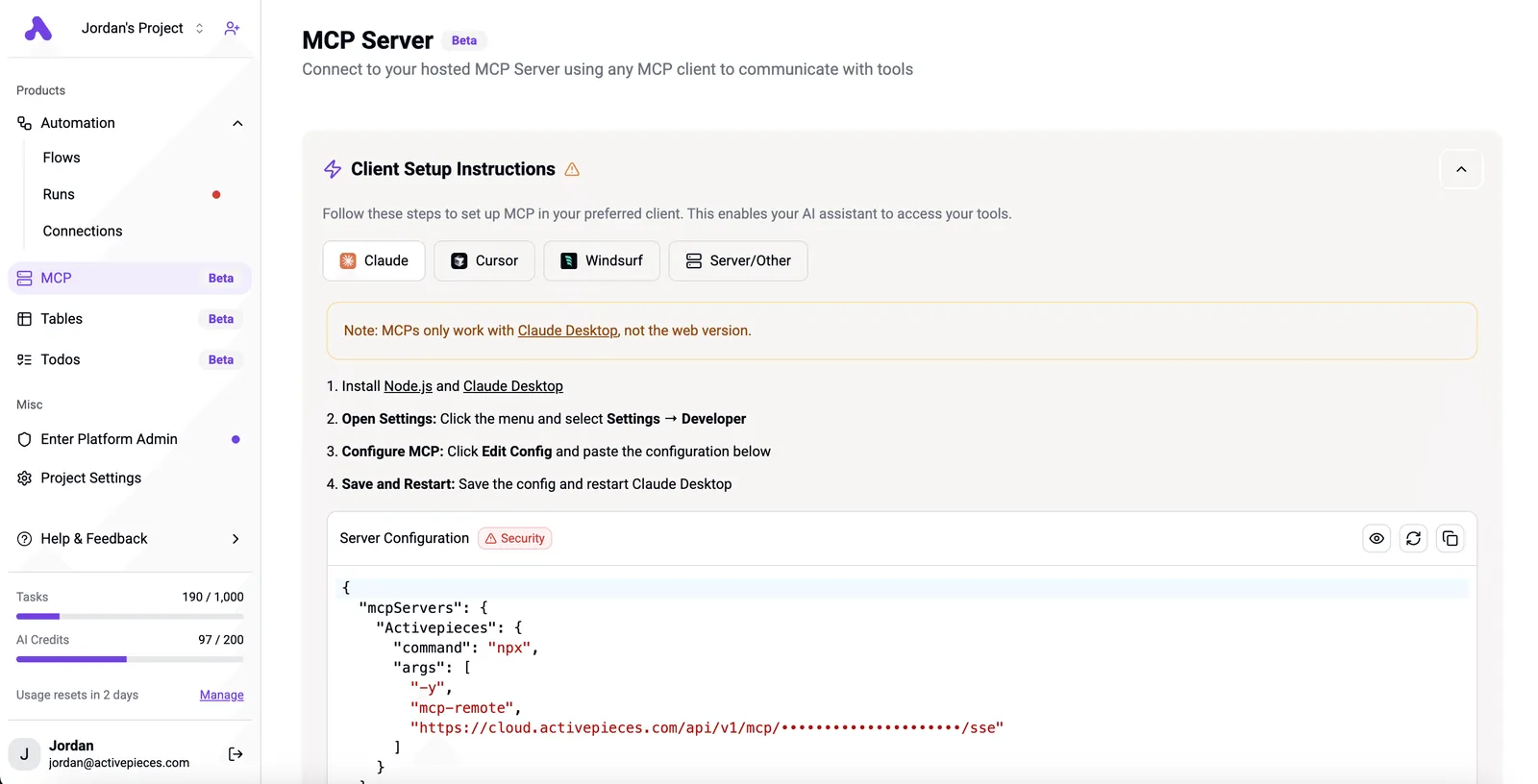
Open claude_desktop_config.json and add an entry under mcpServers. The screenshot below shows a client setup page with tabs for Claude, Cursor, Windsurf and other clients, plus a JSON mcpServers block that launches a server through npx. The shape is what to copy:
- one named entry
- a
command - an
argsarray - an optional
env
Copy that shape for your Suno entry, using the command and args from the README. Save the file, fully quit the client, and reopen it. If the tools list stays empty, read the client's MCP log before changing anything.

Your coding assistant can also be the automation builder: Activepieces exposes a per-project MCP server, and Claude, Cursor or Windsurf connected to it can create, edit and explain a flow through real tool calls, with no separate builder UI open.
MoneyGram, Moneypenny, Alan and FundingSocieties run Activepieces. Ask it to build the schedule that calls your Suno server, then read the tool calls and the resulting changes in the run trace.
You can follow the rest of this with the builder open. Start free, no card.
Generating and extending your first song
Run one generation call, one status loop, one extension and one download, in that order, against the community server you connected.
Step 5: Run a first generation
Send a single prompt through your MCP client and fill in every parameter the server exposes. Field names differ between community servers, so read the tool schema your client lists instead of copying names from a tutorial.
Keep the lyrics short.
A failed long request costs the same plan credits as a successful one, and Suno's own pages are the only place to check what a generation costs you today.
Confirm that a track link or track ID returns. If you get an empty response or an authentication error, stop here. Nothing downstream will work, and the error text is what you paste into the server's issue tracker.
Checking Suno song status, extending and downloading
Don't read a returned link as a finished song: it means the job was accepted, not that the song exists. Generation can outlast your client's default timeout, so a timed-out call may still have spent credits on a track you never see.
Don't read a returned link as a finished song: it means the job was accepted, not that the song exists.
Raise the timeout or poll from a separate call, and keep the track ID so you can look the song up again.
- Poll status until it reports complete. Wait between checks. Hammering the endpoint risks rate limits, and an unofficial server gives you no support channel to appeal them.
- Extend the track, passing the completed track's ID and the point where the new section should begin. Extending is a second generation and draws on credits again.
- Download the audio file and open it. A file that plays is the only proof the whole chain works.
Save the request, the returned ID and the timestamp for each step. When a server update breaks one of them, those records show which step changed.
Suno MCP errors, limits and fixes
Six patterns cover most Suno MCP failures, each with a short fix.
Match an error in your client's log to a first move with the table below.
| Symptom | Cause | Fix |
|---|---|---|
| Calls return unauthorized | Expired session credential | Copy a fresh credential from a logged-in browser session into the server's config |
| Generation refused | Out of credits | Check the balance, wait for the plan refresh or top up |
| Requests rejected while others run | Concurrency limit | Queue calls so only a few run at once |
| Generation stalls or fails on a prompt | Captcha challenge | Solve it by hand in the browser, then retry |
| Suno tools absent from the client | Tools missing after restart | Re-register the server in the client config and restart it |
| Every call fails after previously working | Suno site change breaking the server | Update the server or wait for a patch |
Suno MCP credit and rate limits
When the balance is depleted, it looks like a broken server, which is why credits are the quota that fails silently. Check the balance first.
At the slow end, one generation takes 120 seconds, according to MusicAPI, by which point real-time output is impractical. A client timeout shorter than that reports failure on a song still rendering, and a retry can start a second generation.

Set the timeout above 120 seconds, or poll for the result, since generation times exceed standard HTTP timeout durations.
When a captcha appears, Suno has flagged the traffic as automated. Servers can't solve it for you.
Because these servers sit outside anything Suno supports, treat your account as exposed: use a spare account for experiments and keep call volume modest.
If every call fails after a Suno site change, nothing on your side's wrong. Check the server's issue tracker and update.
Scheduled Suno runs with Activepieces
Activepieces, an open-source workflow tool with an MIT-licensed core, can fire a Suno generation on a schedule, form submission or new sheet row by calling your community server, then record the link, and it allows unlimited flows on every plan, including free.
It doesn't make that server any less unofficial.
Checking available connection methods for Suno
I found no native Suno connector I can point you to, so check its integration catalogue before assuming one exists. What it offers is a generic HTTP step and MCP support, which lets a flow reach the same community server your MCP client already uses.
After your plan credits run out or your session credential expires, a schedule will keep firing. The flow then reports success on a step that returned an error body, and nobody notices until the sheet is empty.

Activepieces doesn't check your Suno credits or refresh a login for you; the 1,000 credits a month on its free plan count runs, at 1 credit per run however many steps it has, not songs.
Build those checks into the flow, and treat the run history as your error-state record.
Trigger, generate, log workflow
The flow has four moves: a trigger starts it, a step passes the prompt to the server, a branch tests the response, and a final step records the result.
Slack, the team chat app, is where failures and finished links should land so a person sees them.
Have the branch stop the flow when the response lacks a track link. Post the raw response to Slack instead of retrying silently. Retries against a depleted plan only spend more of what's left.
This is the order to run before the week's schedule takes over. It goes from cheapest failure to most visible, so each step rules out a cause before the next depends on it.
- Check plan credits in your Suno account, and confirm the week's scheduled runs fit inside them.
- Confirm the session credential the server uses is still valid, and replace it if not.
- Run one test generation by hand through the flow.
- Confirm the schedule trigger is switched on and points at the right time zone.
- Confirm the track link appears in your log or in the Slack channel.
If all five pass, leave the schedule alone. If any fails, go back to the server's issue tracker before changing the flow.
Frequently asked questions
The issue tracker won't settle these five, because they sit outside any single server's code.
Does Suno have an official MCP server or API?
As of 2026-11-12, Suno hasn't published an official MCP server, and the servers covered in this article are community projects. If you build on one, the maintainer owns fixes, so a change on Suno's side can break your flow until someone patches it.
Check Suno's own site for a public API before you commit, since that answer can change.
Can I use Suno MCP on the free plan?
Usually the server can only do what your account can do, so free-plan limits follow you into the automation. If the web app caps what a free account may generate or download, expect the same cap through MCP.
Some servers may also need a feature or setting that only paid accounts have, so read the server's readme before you assume the free plan works.
Is automating Suno against its terms of service?
Read Suno's current terms yourself, because I'm not giving a legal reading. Community servers generally work by acting on your account rather than through a sanctioned interface, and terms often restrict automated access.
If you automate it, your account could be limited or closed, which is the practical risk, and the server's maintainers can't protect you from that. Keep anything you can't afford to lose off an account you automate.
Which MCP clients work with a Suno server?
Any MCP client that can connect to the server's transport should work. Each server's readme says whether it runs locally as a process or is reached over a network connection, and your client has to support that mode.
If a client fails to list the server's tools, check the transport first and the client's version second.
Do songs made through MCP use my credits?
Yes, they draw on your Suno plan credits, because the generation still happens on your account. Generating and extending a song are the actions that spend them, so a loop that retries on error can burn credits without giving you a finished track.
Put a retry limit in your flow, and check the current cost per action on Suno's pricing page, since that figure is theirs to change.
Related reading
References
Build it
Set this up in minutes.
No code required. Connect your accounts, and Activepieces runs it from there.
Start free Talk to sales