
Trigger.dev Alternatives for Each Use Case in 2026

Nov 3, 202614 min read
You need durable code, a visual workflow (the kind of thing Activepieces sits in) or a mature queue, and the best alternative depends on which. This guide matches tools to those three jobs and doesn't rank them, so your choice depends on your situation.
Choose trigger.dev alternatives by job, not rank
Why teams leave trigger.dev, in short
Leaving is rarely about a defect. Trigger.dev's code-first and still young, so most teams that leave are hitting a mismatch in what they need. Pick the job first and the tool follows.
Leaving is rarely about a defect. Trigger.dev's code-first and still young, so most teams that leave are hitting a mismatch in what they need.
Read across one row and ignore the others. The table shows the three needs, the alternative that fits each, and why.
| The need | Best-fit alternative | Reason to pick it |
|---|---|---|
| Durable code | Temporal | Workflow state is persisted, so long-running code resumes after a crash or deploy instead of restarting. |
| Visual workflow | A node-based visual builder | Non-engineers can build and edit flows, so automation is not bottlenecked on developers. |
| Mature queue | BullMQ | A long-established Redis-backed queue, so you adopt known behavior over novelty. |
Prices and plan limits checked against trigger.dev and trigger.dev and trigger.dev and devtune.ai on November 2, 2026.
Check the date before you trust any figure here. Pricing and limits change, so recheck before you commit.
The fastest way to settle a shortlist is to try one. Activepieces is free to try, no credit card.
What trigger.dev is and what it costs today
Founded in 2022, Trigger.dev's a TypeScript platform for running background jobs and workflows as code. Its free plan starts with $5 a month in credits, which means most production workloads require a paid plan.
What trigger.dev is and who makes it
In Devtune's dossier, it's described as an open-source, TypeScript-native platform for building and deploying managed AI agents and background work.
The maker's Trigger.dev itself, backed by Y Combinator and Standard Capital. So the adoption stage is early: you're choosing a young product from a funded team, not a decade-old standard.
Ordinary serverless functions time out. That timeout is why this category exists.
Per the AWS Lambda documentation:
- Standard Lambda stops a function at 900 seconds, which is 15 minutes
- Vercel Pro allows 1800 seconds, or 30 minutes
- Lambda Managed reaches 5400 seconds, or 90 minutes
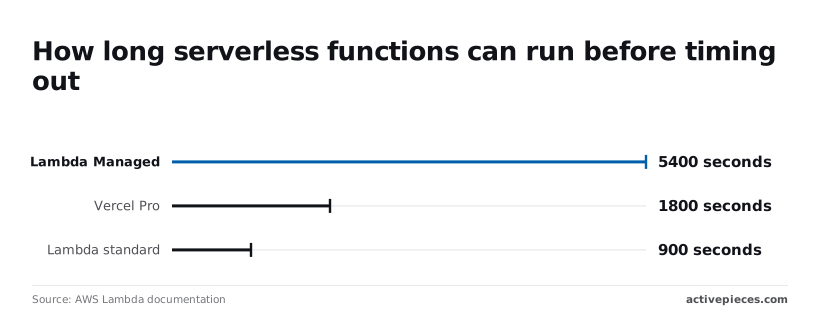

Once a job outlasts those ceilings, it can't finish inside a single function.
Because the code's Apache 2.0 licensed, your team can self-host it and keep jobs on its own infrastructure. The hosted cloud runs in three regions, which matters if data location is on your compliance checklist.
Expect a pilot team to hit these free-tier numbers first:
- $5 a month in free credits, so a prototype costs nothing but a heavy job will exhaust it quickly.
- 20 concurrent production runs, so a burst of traffic queues rather than running in parallel.
- 1 day of log retention, so a failure noticed on Monday may have no logs left by Wednesday.
Reasons teams switch from trigger.dev
Even with spend caps, the question isn't settled, because teams leave trigger.dev for four reasons and only one concerns money:
- The product is young, with a short track record.
- The billing limit can discard queued runs.
- A code-only model leaves non-developers unable to own workflows.
We have neither tested nor used the product ourselves, so what follows rests on the maker's own account and on what the design implies.
Because a newer tool sits earlier on the adoption curve, fewer teams have run it through upgrades, outages and odd edge cases.
For a workflow the business depends on, it means you carry more of the discovery risk yourself, and a mature queue starts to look more attractive.
Trigger.dev's November 2026 security incident
In Trigger.dev, the maker said "There has been a security incident at Trigger.dev," and reported that it has blocked the exploit used in the attack. The incident exposed environment variables, which is where teams keep API keys and database credentials.
Anyone who stored secrets there has to rotate them and review what those credentials could reach.
Even a safety mechanism has a cost, and the billing limit's is this: when the limit is reached, queued runs can be discarded rather than held.
So a cap that protects the budget can silently drop work, and anything that must run exactly once needs a plan for that case.
Because every workflow here is written and changed as code, developers get durable, reviewable logic, but the operations or marketing team that depends on the workflow can't read or edit it.
Ownership stays with engineering, and each change becomes a ticket.
The benefits of staying with trigger.dev
That move only pays off if business users will really edit the automations, and if they won't, the The case is to stay.
The case for staying
Being new and code-first is what makes people uneasy, but it's also the product. Your automations live in the same repository as everything else, go through the same pull-request review, and fail with stack traces your engineers already know how to read.
Long-running work, retries and durable execution are written as ordinary code, so the people who fix a broken run are the people who wrote it.
When leaving trigger.dev is the right call
Leaving is right when the people who maintain the automations aren't engineers.
Look at the canvas below.
It shows a four-step flow titled Test Flow: a daily schedule trigger, a code step that picks a topic, an HTTP request to a keyword service, and an agent step that writes the blog post from a prompt referencing the earlier steps.

Each step's a labelled box, so a content marketer can change the prompt or swap the keyword source without opening a repository or waiting on a deploy.
If that team is blocked on an engineering queue, a visual builder removes the blocker.
Activepieces goes further, because you don't hire for this, you describe it: marketing operations explain the process in the built-in chat, and it publishes a live flow in the account, the same artifact a builder would have made by hand.
That flow runs under the same RBAC and audit logs as every hand-built one, and each run leaves a trace anyone on the team can open and read, no certification needed. MoneyGram, Moneypenny, Alan and FundingSocieties run Activepieces in production.
Trigger.dev alternatives compared in one table
Once you know who's building, the table tells you what they should build on, because the five alternatives split into durable code (Inngest, Temporal, Hatchet), a mature queue (BullMQ) and a visual builder.
How the trigger.dev alternatives compare on price
Read the main-limit column first, since that's where a tool stops fitting your team. The table sets the five tools against price, core strength, main limit and who each suits.
Ranked by job: durable code, queues, visual workflows
Ranking by job beats ranking by score, because the same tool can be the best and the worst choice depending on the need.
Durable code means steps that survive crashes and resume where they stopped. Inngest, Temporal and Hatchet sit there, and Temporal's the one with a visible track record.
On funding, Temporal stands apart: it raised $100m in a 2022 Series B, then $75m in a 2023 Series B, followed by $146m in a 2025 Series C and a $105m secondary the same year.
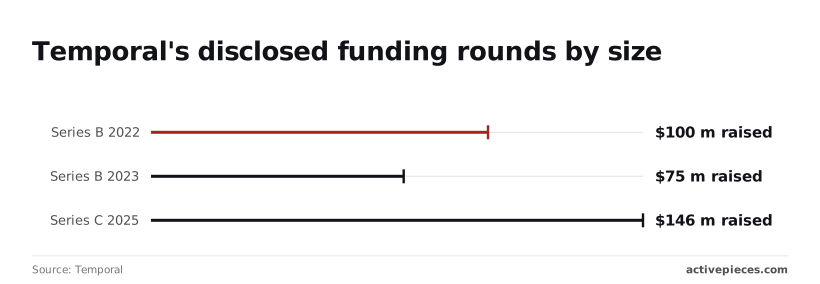
That's four rounds totalling $426m, so a steering committee asking whether the vendor will still exist in five years gets a stronger answer here than for a younger tool.
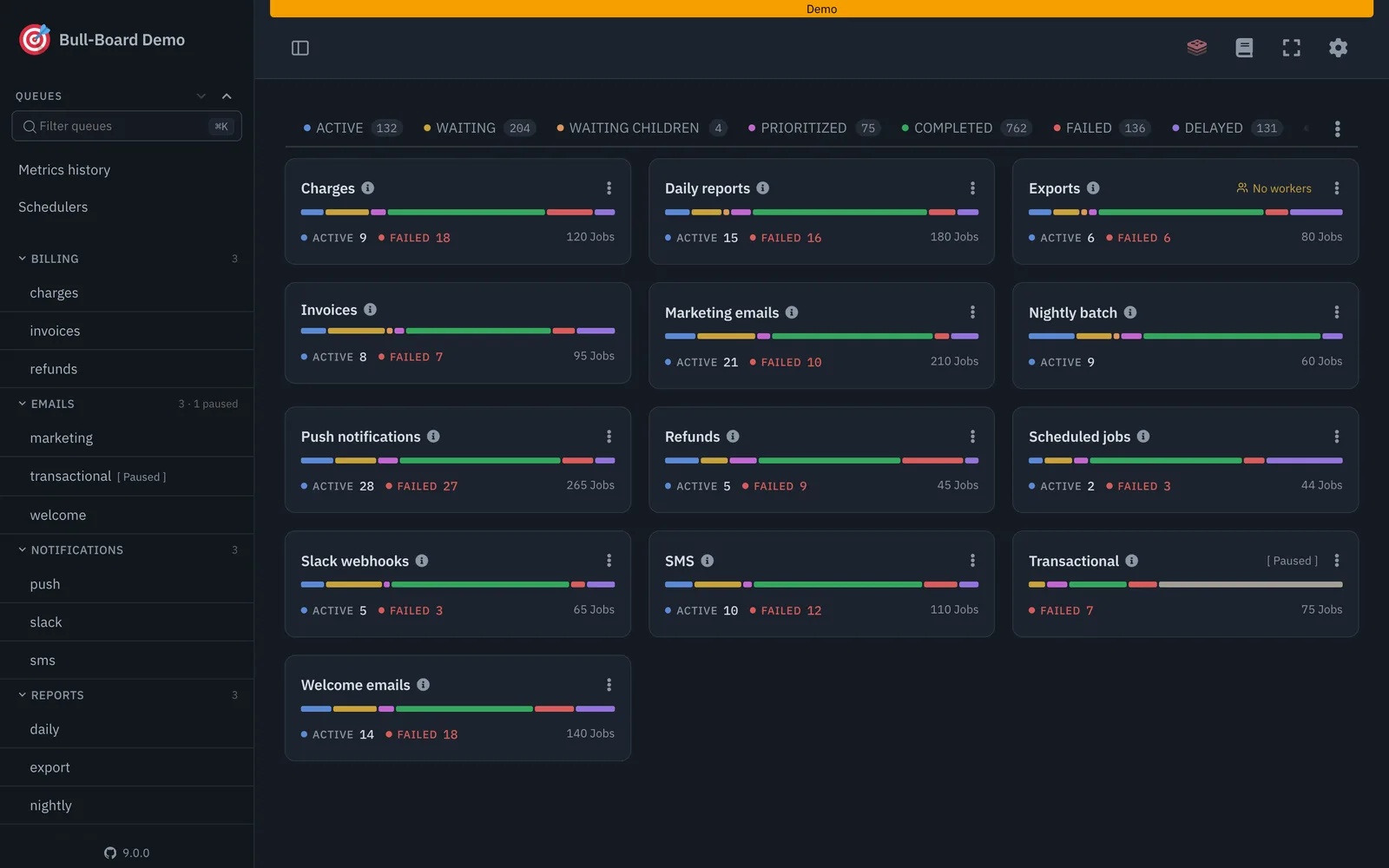
If you already run Redis, need a proven job queue, and don't need workflows that pause for days, BullMQ is the answer. The visual builder answers a third question: non-developers own the automation.
What trigger.dev alternative vendor pages leave out
Funding shows durability, not fit, so a well-funded engine can still be too heavy for a team that needs one background job.
Reading a table only gets you so far. Build the same workflow in Activepieces and compare it yourself.
Where code-first alternatives beat a visual builder
A visual builder isn't the right answer just because trigger.dev is code-first.
If your engineers own the work, the other alternatives are stronger choices than any canvas, and they deserve to be judged on the same criteria: track record, who can own the result, and where the tool stops fitting.
Durable execution suits long, failure-prone code
Temporal is the strongest answer when a process must survive crashes, deploys and days of waiting. It records each step of a workflow, so code that stopped mid-way resumes where it left off rather than starting again.

It also isn't tied to one language. Temporal offers SDKs for several, so a team that mixes TypeScript with Go or Python services can run one engine across all of them, which a TypeScript-focused platform can't offer.
The limit is weight. You run a cluster or pay for the hosted service, and your team has to learn how workflow code must behave so it can be replayed safely.
For one nightly job that's too much machinery, but for a payment flow that can't lose its place it's what you're buying.
A plain queue suits simple, high-volume jobs
BullMQ earns its place by being boring. If you already run Redis, it gives you retries, delays, scheduling and rate limits with behavior that many teams have already tested for years. The adoption risk that worries people about a young tool mostly disappears.

Its limit is the other side of that simplicity. It's a queue, not a workflow engine, so long pauses and multi-day orchestration become code you write yourself.
Non-developers can't read or edit it either, which makes it a poor fit if the business wants to own the automation. Choose it when the job is simple and the owners are engineers.
Inngest and Hatchet suit teams that want durable steps with less machinery
Inngest and Hatchet are the closest like-for-like swaps for trigger.dev, because they also keep workflows as code in your repository.
Inngest is built around events and step functions, so a team can add retries and resumable steps to an app it already deploys without standing up a cluster.
Hatchet is open source and leans on Postgres, which appeals if you'd rather not add Redis or a separate orchestration service.
Both share trigger.dev's main weakness, which is age. Neither has Temporal's funding history or BullMQ's years in production, so you inherit some of the same discovery risk that pushed you to look.
Judged on who can own the result, they're also code-only, so a marketing team still can't edit them. Choose either when your engineers want durable code with a lighter footprint than Temporal, and treat a short pilot as the proof.
The same three criteria point to different winners
On track record, Temporal and BullMQ lead and the younger engines trail. On weight, the order reverses: BullMQ is Lighter-weight options come first, Inngest and Hatchet sit in the middle, and Temporal asks more of your team.
On ownership, all four of these tools hand the result to engineers. If your engineers are the people who will fix and change the automation, that is a feature, and none of them needs a canvas on top.
Only when someone outside engineering must own the flow does the visual builder earn its place.
Connect trigger.dev to Activepieces workflows today
Trigger.dev is connected from the outside, and the routes below run from least to most setup.
At the pilot stage, Activepieces can chain business steps (approvals, notifications, record updates) around the tasks, agents and workflows Trigger.dev already runs.
It's not a replacement. We haven't run trigger.dev ourselves, so read these as wiring plans to test, not verified recipes.
Adopt them in this order, because each asks more of your team than the one before:
- A private integration for trigger.dev, generated with AI and used in an Activepieces flow.
- An AI step with a custom or OpenAI-compatible provider.
- An MCP server.
Because there is no native trigger.dev integration, you can generate one with AI and add it privately to your own Activepieces instance, then use it in a flow to start a trigger.dev task and pass it data.
Store the secret key as a connection rather than pasting it into the flow.
Otherwise anyone who can edit the flow can start production jobs.
Build the step once as a shared template, so every team inherits the key handling, and track how many flows start from that template versus hand-built copies.
Only if something in front of your task speaks the OpenAI-style chat format does the AI step route apply, and you would have to build that.
We haven't seen trigger.dev offer that endpoint by itself. Without it, this option is a detour, and the private integration does the same job more directly.
Instead of calling fixed URLs, an agent inside a flow can discover your tasks as tools through an MCP server. The cost is a server you write, host and keep current. Pilot this last, once the private integration has shown which tasks are worth exposing.
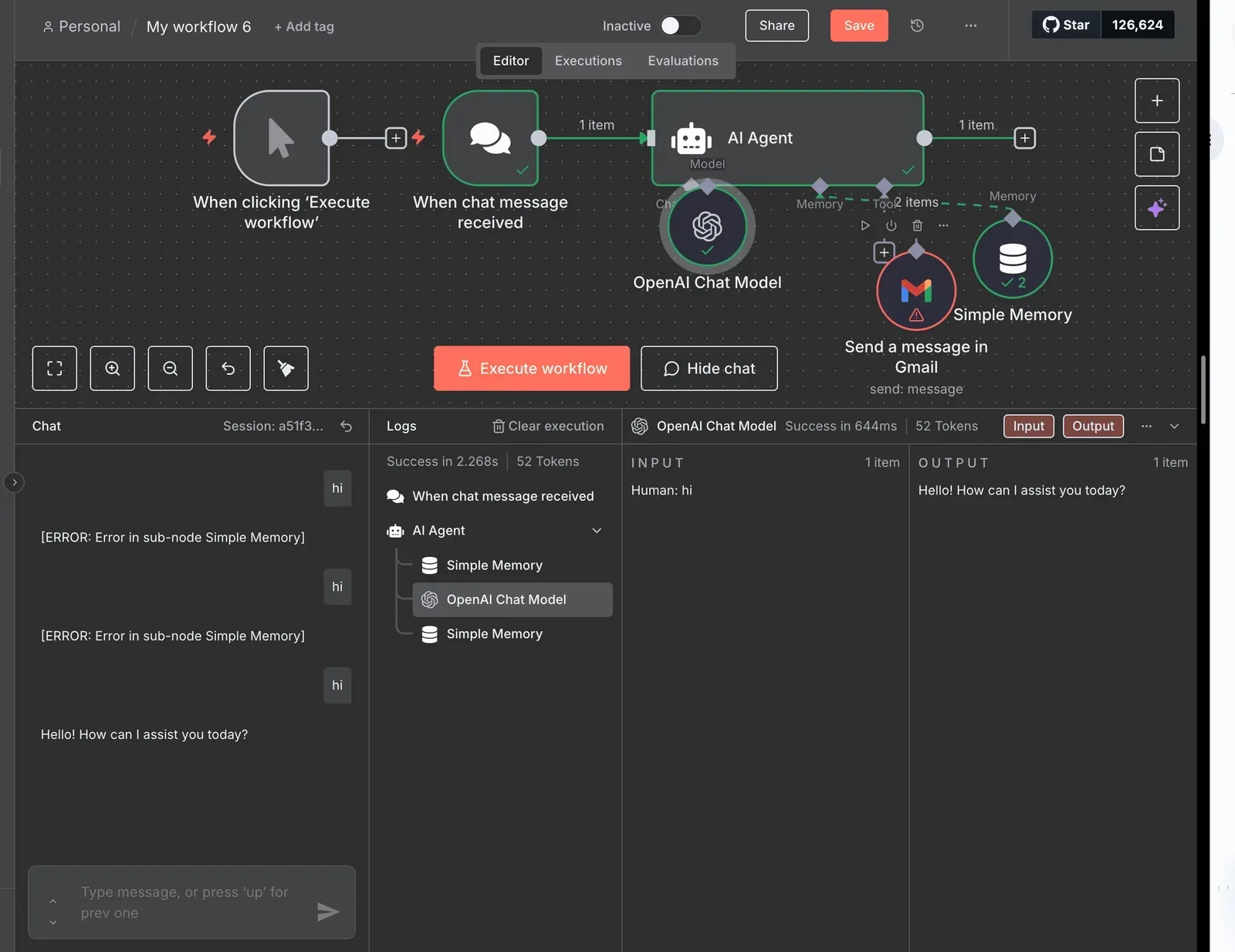
If the work is long-running, retried, versioned code, keep it in trigger.dev and let Activepieces only call it. If your whole team already writes code, a visual layer gives logic a second place to hide.
Where Activepieces runs is a setting rather than a commitment: its MIT-licensed core self-hosts via Docker, Compose or Kubernetes, so it can sit beside a self-hosted trigger.dev without either deciding where the other lives.
Frequently asked questions
Is trigger.dev open source and can it be self-hosted?
Yes. Trigger.dev publishes its code under an open source license and supports self-hosting, so you can run the platform on your own infrastructure instead of using the hosted cloud.
The consequence's operational: you take on upgrades, scaling, and on-call for the system that runs your background jobs. Treat self-hosting as a stage-two decision, after a pilot on the hosted version has shown the workload is worth owning.
How hard is it to migrate off trigger.dev?
It's moderate and mostly mechanical, because your business logic lives in ordinary code in your own repository.
What changes is the wrapper: how tasks are declared, how retries and schedules are configured, and how runs are triggered. The work is rewriting that surface, not the logic underneath.
If you're moving to a visual tool, expect more rework, since logic written as code has to be rebuilt as steps.
Is a new tool like trigger.dev safe for production?
It can be, provided you decide by evidence rather than by age. Newness means a smaller body of known failure modes and fewer people who have already hit your edge case.
Can I use trigger.dev and a visual workflow tool together?
Yes, and it's a sound split when the audiences differ. Let engineers own long-running, retry-heavy work in trigger.dev, and let operations or marketing staff assemble lightweight automations visually.
The two connect through webhooks or API calls, so a visual flow can start a code task and receive its result. The cost is two places to look when something fails, so agree early on which system is the record of truth.
Related reading
References
Still comparing
The fastest way to settle it is to build something.
Open source under MIT, so you can self-host the same thing later.
Start free Talk to sales