
Claude Meetings: How to Automate Your Workday with Claude Cowork

Nov 14, 202612 min read
When a meeting starts, Claude Meetings transforms the AI from a passive post-call summarizer into a visible participant that performs work during live video sessions.
While this native conferencing interface, much like the way Activepieces connects disparate software tools, reflects current capabilities within Anthropic’s agentic ecosystem, it illustrates the shift toward real-time environment manipulation.
According to Docs, by integrating Claude directly into the call interface, Anthropic allows it to handle demanding reasoning and long-horizon agentic work while the conversation is still active.

This scenario reflects a deep integration where the model functions as a native participant rather than an external listener.
Active environment manipulation is the new technical requirement, replacing simple recording bots. The interface for these agents shows how they move from chat to tool execution.
Claude Meetings launches as a native AI conferencing tool
The following configuration screen demonstrates how you'll define the specific scope and utility of an agent before it enters a live environment. Pre-defining toolsets is a necessity highlighted by this setup screen.

Connecting to a CMS or a research database allows the agent to execute tasks without manual intervention during the call.
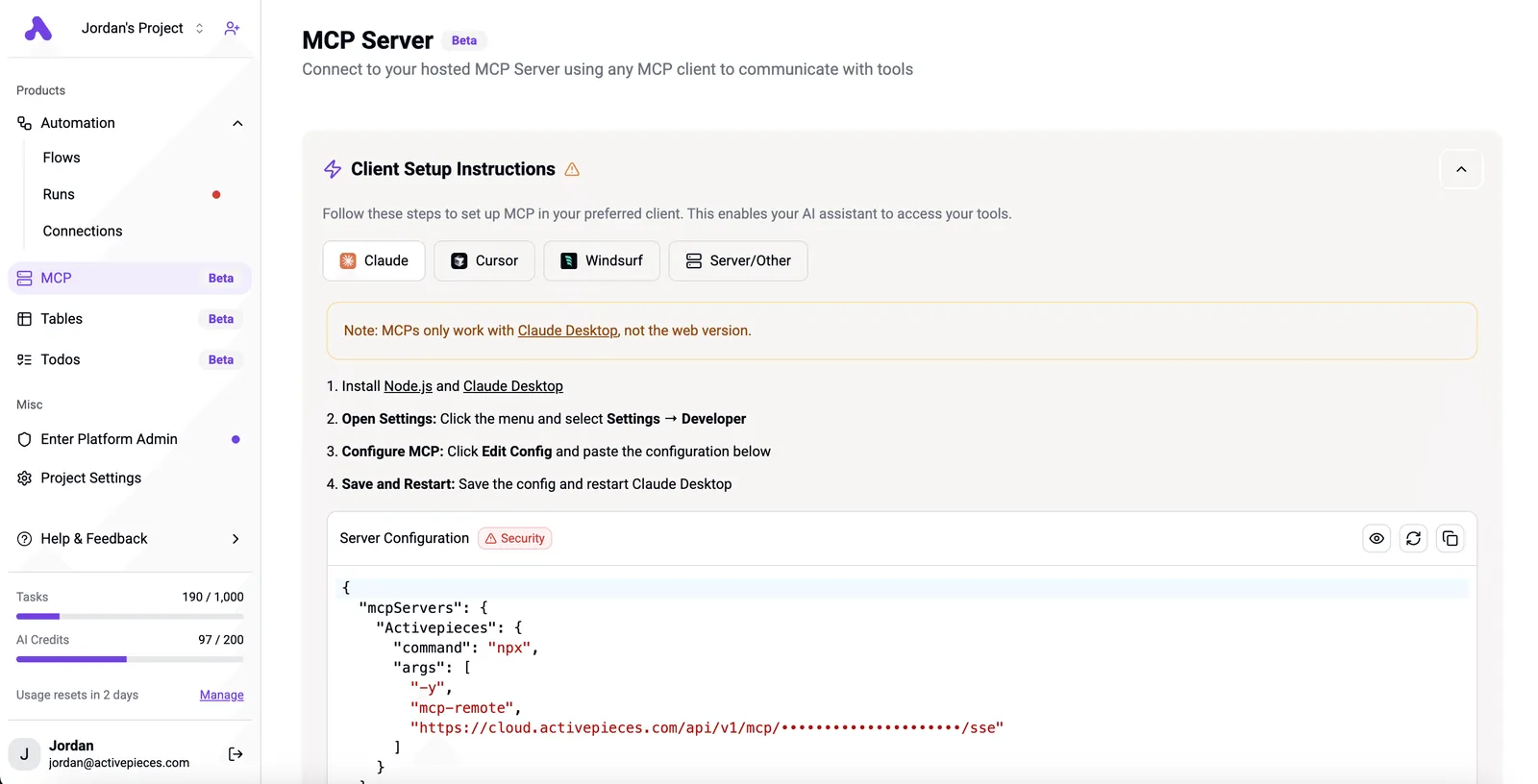
Activepieces exposes every connected integration as a tool schema on a per-project MCP server, allowing an agent to call any of its 748 integrations as easily as a flow step.
Because the same integration action runs in a flow or as an MCP tool, Claude can reach your existing stack without a second migration or a manual export step.
Real-time tool management in live sessions
A live injection of data is required for native participation, whereas traditional automation relied on a webhook firing after a meeting ended. The workflow lead must now manage real-time tool access for the participant.

They must also define structured output schemas for immediate data extraction and system prompts that define the agent's behavioral boundaries in a group setting.
Without waiting for the call to conclude, the model uses these boundaries to determine when to query external databases or update project trackers.
This takes minutes, not a project: automate it in Activepieces free.
Why native meeting intelligence matters for automation teams
Brittle middle layers of third-party transcription bots are eliminated by native meeting intelligence. When the AI is a native participant, it captures the raw semantic intent and context of the meeting in real-time.
This approach prevents an automation lead from having to build post-hoc parsers for a messy transcript export.
Model-driven workflow injections replace simple "if-this-then-that" triggers, allowing for technical feasibility verification before the meeting even ends.
Old bot recording vs new native Claude reasoning
The "Old Way" relies on a bot joining as a guest to record audio. This audio is processed into a text file and sent to an external LLM for summary, which often loses non-verbal cues and introduces latency.
The model interacts directly with an MCP server to query a database or update a Jira ticket while the participants are still speaking.
Automation teams can now move away from basic record-keeping toward autonomous execution, since Claude Meetings lets Claude use connected tools with permission during the call.
A set of confirmed API calls is the real output of a sync, not a document to be filed. These calls have already updated the state of the business.
A set of confirmed API calls is the real output of a sync, not a document to be filed.
Claude Sonnet 5.5 vs upcoming agentic features
The features described in this guide reflect the current agentic ecosystem capabilities built on Claude.
While users currently utilize Projects and Artifacts for static collaboration, the rollout of live participation marks a shift toward real-time environment manipulation.
The measurable features of the Claude Meetings interface
Claude Meetings is a dedicated visual layer within the Claude interface that treats conversational audio as a structured, editable data stream rather than a static recording.
This shift transforms the meeting from a fleeting event into a permanent asset where the model can reference past decisions to inform current outputs.
The persistent Meeting Space archive
All transcripts and generated summaries reside in the Meeting Space, a centralized repository for long-term retrieval. Because this archive is native to the platform, Anthropic allows you to prompt against the entire history of a project’s verbal discussions without manually re-uploading text files.
Logic requirements discussed in earlier meetings can be pulled directly into a new script by a developer using Claude.
You can watch the AI draft structured summaries and action items in a side-panel while the conversation is still active through real-time collaborative note-taking.
Unlike standard transcription tools that deliver a "dump" after the call, this interface lets you correct the AI's interpretation mid-sentence.
Pricing and seat requirements for Teams
The specific subscription tier dictates access to these collaborative features, as well as the available context and how long the current feature set is guaranteed. The following table outlines the current investment required to deploy these tools across an organization.
| Plan | — | — | — |
|---|---|---|---|
| Pro Plan | — | — | — |
| Team Plan | — | — | — |
| Enterprise Plan | — | — | — |
Prices and plan limits checked against claude.com and docs.claude.com and openai.com and gemini.google on November 14, 2026.
The Team plan shared workspace is the entry point for enabling cross-functional meeting archives.
You can follow the rest of this with the builder open. Start free, no card.
How to connect Claude Meetings to your existing workflows
Claude Meetings integrates with enterprise automation by exposing meeting data as actionable triggers within a centralized orchestration canvas. This shift allows teams to move from passive recording to active workflow injection where a verbal agreement in a call initiates a sequence across distinct software platforms.
Option 1: using the HTTP integration for API webhooks
The HTTP integration is the primary bridge for developers who need to capture raw meeting events from Claude Meetings as they occur. By configuring a Webhook trigger, you can ingest structured JSON payloads (containing speaker diarization and timestamped intent) directly into a workflow.
An "urgent" tag identified during a live session hits a notification queue without waiting for a batch sync.
The following workflow demonstrates how an AI-driven trigger translates a conversation into a cross-platform sequence:
The canvas shows a seven-step workflow: 1. New Lead (HubSpot trigger), 2. Qualify Lead (AI Agent step with purple border), 3. Qualified? (Condition), 4. Add to Salesforce, 5. Notify Slack, 6. Nurture Lead (Loop), and 7. Send Email (Gmail).

Steps are connected by vertical lines showing the flow logic.]
Activepieces places an Agent step alongside deterministic automation steps inside one flow definition, ensuring judgment and rules run on the same engine.
Companies like MoneyGram and FundingSocieties run this in production to maintain a single execution trace for their meeting-driven workflows, rather than bridging two products with a webhook.
Connecting Claude Sonnet via OpenAI-compatible AI steps
Standardized AI steps let you swap the underlying model logic while maintaining the same integration hooks for your meeting data.
By utilizing the OpenAI-compatible provider setting, you can point a workflow step toward the Claude API for complex reasoning or classification tasks.
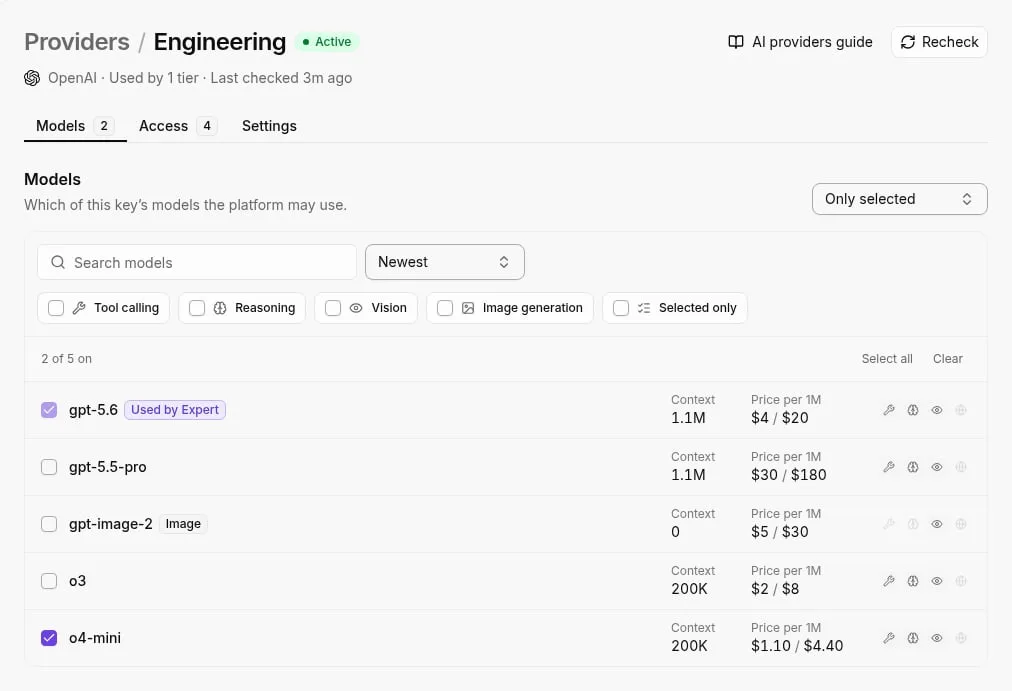
The intelligence layer remains modular with this configuration. You can use Claude for long-horizon agentic work.
Using Model Context Protocol (MCP) servers with Claude
Claude Meetings can securely query and write to local or private data sources that lack public webhooks using Model Context Protocol (MCP) servers.
This protocol is a standardized interface, allowing the AI to fetch context from a local database or a proprietary file system to enrich a meeting summary before it is sent to a downstream tool.
By deploying an MCP server, you provide the model with a secure "reading room" where it can verify meeting claims against historical records without exposing that sensitive internal data to the public internet.

Claude Meetings compared to existing AI meeting assistants
Claude Meetings replaces the passive summarization found in legacy assistants with a persistent reasoning environment where the model retains context across multiple sessions.
While Zoom AI Companion (a generative tool bundled with paid Zoom plans) and Microsoft Teams Premium (an add-on for the Microsoft 365 suite) focus on generating immediate post-call artifacts, Zoom AI Companion unifies context across meetings rather than treating each as a discrete event.
Transcripts don't need to be manually re-uploaded to ask questions about a project's history because of this continuity. Claude Meetings allows the model to reference past decisions natively.
The utility of these assistants depends on the underlying model's ability to hold the entire conversation in active memory.
Claude Meetings context window and memory limits
It shows how much historical data the assistant can process before it begins to forget the start of the call.
This capacity determines whether an agent can verify a new technical requirement against a three-hour architectural review held last month. Beyond memory, the architectural differences define how these tools handle data.
Session data is retained by Zoom AI Companion across meetings, connecting context from past meetings, messages, and files rather than clearing it after each summary.
Microsoft Teams Premium utilizes the Microsoft Graph, which is a gateway to organization-wide data, to ground summaries in existing files, but it limits the model’s agency to the Microsoft ecosystem.
Claude Meetings uses the Model Context Protocol to bridge the gap between the live call and external developer tools. The model can update a ticket or trigger a build directly from a verbal command.
The Monday morning checklist for meeting automation
Transitioning to native AI participation requires a systematic audit of where your organization currently pays for passive observation versus where it needs active reasoning.
While the OpenAI Free plan costs $0 per month and provides basic intelligence, the shift to agentic workflows relies on identifying high-leverage interactions, which means users must determine where automation actually adds value.
$20 per month for the Plus plan or enterprise-tier API access is justified by these interactions, so the cost is effectively an investment in operational efficiency. The following checklist ensures that your automation budget moves away from simple recording and toward model-driven execution.
- Audit current bot seats to identify redundant transcription services that only provide text logs without actionable follow-ups.
- Identify high-reasoning meetings, such as strategy sessions or architectural reviews, where deeper analysis is needed.
- Map Claude output to a specific API trigger to ensure meeting decisions immediately update project management boards or code repositories.
"Dead data" (transcripts that sit in a dashboard without ever reaching a developer's task list) is prevented by this audit.
By isolating meetings that require complex reasoning, leads can ensure that long-horizon agentic work begins the moment the call ends.
Once these triggers are mapped, the technical implementation focuses on the specific bridge between the meeting environment and the external API.
What Activepieces does about this
Activepieces bridges the gap between Claude’s native reasoning and your actual business operations by providing the execution engine for these real-time triggers. While Claude identifies the intent during a meeting, Activepieces acts as the nervous system that carries that intent to your software stack.
Because the platform is open-source under the MIT license, teams can self-host the entire automation layer to ensure that sensitive meeting data never leaves their private infrastructure while being processed.
The platform handles the complexity of model-driven workflow injections by treating Claude as a native participant in a larger sequence.
When a verbal agreement is reached in a call, Activepieces uses its library of 748 integrations to instantly update records in tools like Jira, Salesforce, or GitHub.
This eliminates the "dead data" problem by ensuring that every insight captured by Claude results in a deterministic change in your project management systems.
Enterprise users like MoneyGram rely on this architecture to maintain a single, auditable execution trace for every automated action. By using the Activepieces MCP server, you can expose your entire suite of connected apps to Claude as a set of tools.

This allows the AI to not only summarize the meeting but to actively query your production databases or trigger deployment pipelines during the conversation, transforming the meeting from a passive discussion into a live control center for your workday.
Frequently asked questions about Claude Meetings
A clear understanding of the platform's operational boundaries and compliance standards is required to secure the bridge between live conversation and external APIs.
Claude Meetings is restricted to paid professional tiers. The high-context reasoning required for real-time participation demands the compute resources allocated to Claude Enterprise and Team accounts.
Automation leads don't need to manage additional software deployments or hardware drivers because Claude Meetings is a native component of the existing Claude desktop and web interfaces.
It joins calls as a virtual participant via the browser, allowing it to interact with the meeting environment without bypassing standard corporate endpoint security policies.
How does Claude Meetings handle data privacy for Teams?
Proprietary meeting logic and sensitive transcripts remain isolated because the platform enforces a strict boundary between user interactions and model improvement. This architecture is built on three data privacy pillars.
Anthropic doesn't train on Team or Enterprise data. Your internal strategic discussions never influence the global weights of Claude models.
Data retention controls allow administrators to set specific expiration windows for stored meeting artifacts to align with internal legal requirements.
When an API injects a task into a workflow based on a meeting trigger, these safeguards ensure that the underlying data remains within the organization's controlled environment.
Build it
Set this up in minutes.
No code required. Connect your accounts, and Activepieces runs it from there.
Start free Talk to sales