
Command A+ from Cohere: Specs, Pricing and a Test Run

Oct 23, 202613 min read
Treat anything you read about Command A+ as a claim to test, not a settled fact, much as you would test a new step in an Activepieces flow before trusting it.
It is a new Cohere model, and OpenRouter lists it as "Cohere: Command A+" on its own model page, so there's little track record.
Cohere released Command A+ and OpenRouter lists it
What Command A+ is
In OpenRouter's words, it is "Cohere's flagship model for enterprise agentic workflows." In practice, that means a model aimed at multi-step work in which it calls tools and passes results along, not at chat alone.
The page lists text and image as inputs, so a workflow can send it a screenshot or a scanned document as well as plain text.
Two parties are involved, not one. Cohere's the maker, and OpenRouter hosts the listing: Cohere owns the model, OpenRouter owns the routing layer you connect through, and whoever creates the API key on your side owns that connection.
Command A+ facts from the OpenRouter model page
Every fact here comes from the OpenRouter model page, read on the date below.
The record holds the model name (Command A+), the maker (Cohere), the listing location (the OpenRouter model page linked above) and the check date (2026-10-23), so you can check each one against the page yourself.
Because the page can change after that date, re-read it before you rely on any detail.
If you are running this arithmetic for your own team, see what the same workload costs on Activepieces.
Model swap impacts on automation teams
Swapping the model behind a single workflow step changes three things you can measure. A model reachable through a standard API lets you try that swap without rebuilding the workflow around it.
Command A+ swap effects on cost, speed, quality
Read this as the list of columns your own test needs to fill in: the bullet below names the three variables a swap moves, each tied to one step, summarising a support ticket.
- Cost per run: the price of one ticket summary, which multiplies by every ticket the workflow handles in a month.
- Response speed: how long the summary takes to come back, which decides whether a person waiting on the result notices the delay.
- Output quality: whether the summary keeps the customer's request, the order number and the deadline, which decides whether anyone has to rewrite it.
Cheaper but slower, or faster but less accurate: each variable can move in a different direction, and you only see the trade by running the same ticket through both.
That's why this article compares Command A+ with openai/gpt-5.4-mini on the same three tasks, which means any conclusions apply only to these specific operations.
What to decide before testing
Decide first who owns the connection: whose OpenRouter key the test uses, what spending limit sits on it, and who can revoke it. A test key left in a shared workflow is a standing cost with no named owner.

Then decide what counts as a pass. Open-weight models are no longer a fringe choice.
An ETR survey reported by Constellation Research found 42% of enterprise teams running them in production and 43% piloting them, which leaves only 15% doing neither.
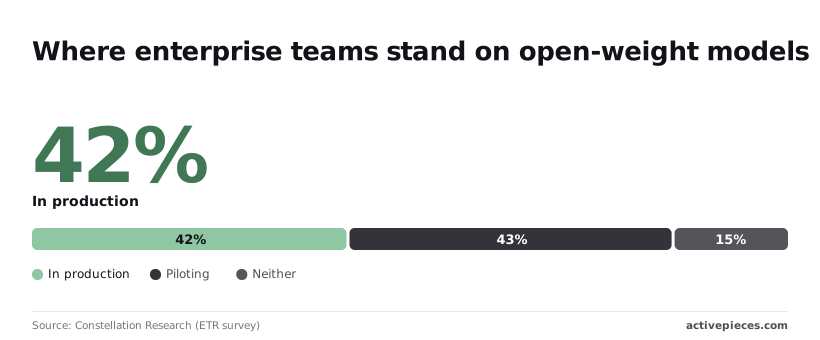
So most of your peers are already comparing models, and a test with a written pass mark puts you in that position without guessing.
Command A+ specs and pricing from Cohere's listing
OpenRouter lists Command A+ as a Cohere model and states its context length, prices and modalities; only the parameter count is not stated.
Read "not stated" as a gap to close on the live page before you size any workload, not as a zero. The table shows what the OpenRouter page gives for each row as of 2026-10-23.
| Item | Value on the OpenRouter page |
|---|---|
| Context length | 192K (192,000 tokens) |
| Input price per million tokens | $0.30 |
| Output price per million tokens | $1.50 |
| Parameters | not stated |
| Modalities | Text and image input, text output |
| Access | OpenRouter, plus open weights on Hugging Face |
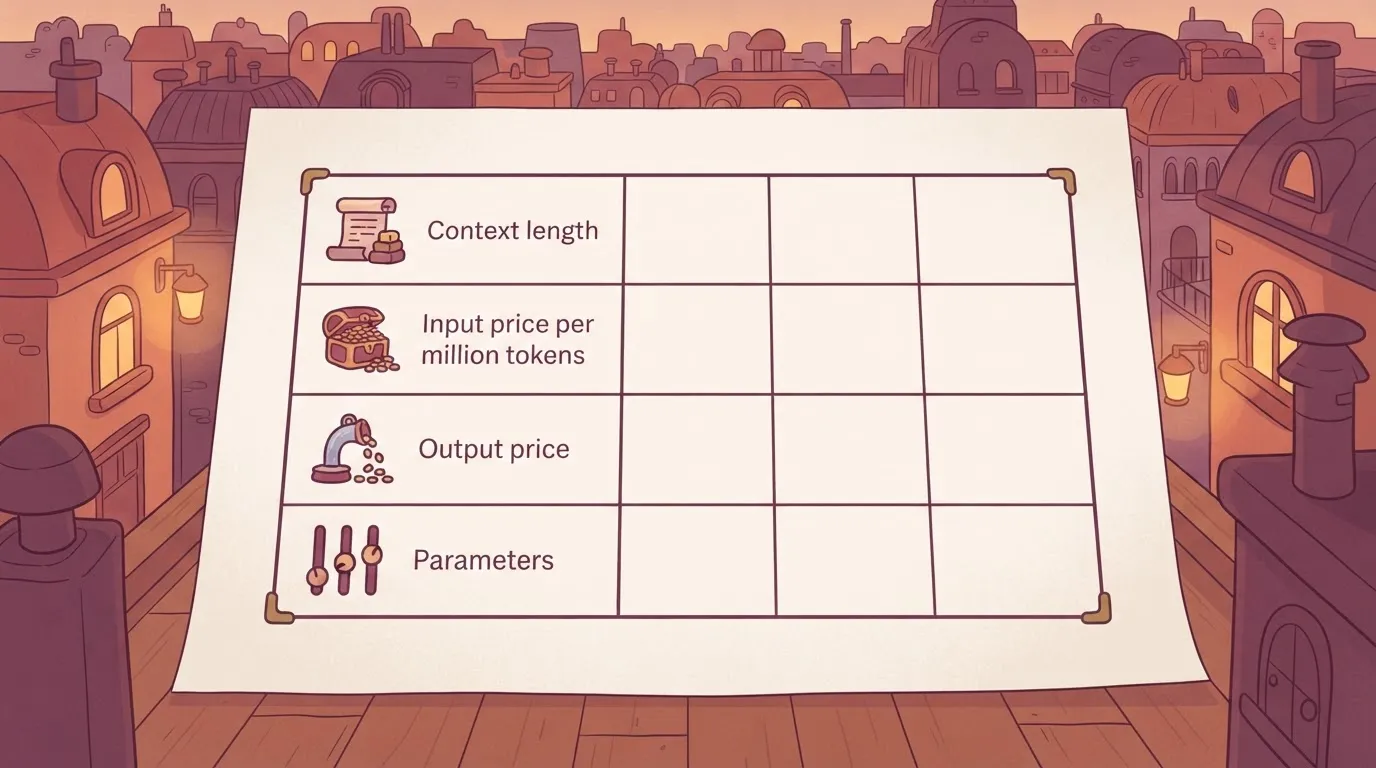
With a 192,000 token context window, most documents should fit, but check your longest ones.
With prices of $0.30 per million input tokens and $1.50 per million output tokens listed, token rates alone still don't give a cost-per-task figure. The cost comparison against openai/gpt-5.4-mini therefore rests on the test, not on a rate card.
Use an OpenRouter API key created under an account your team owns, so the connection has a named owner when the person who set it up moves on. Any tool that can call OpenRouter can then reach the model.
Self-hosting Command A+ hardware requirements
If you would rather not use the hosted route, you run the weights yourself. Cohere Labs' Hugging Face page puts BF16 (16-bit) at 8 H100 GPUs, FP8 (8-bit) at 4, and W4A4 (4-bit) at 2.
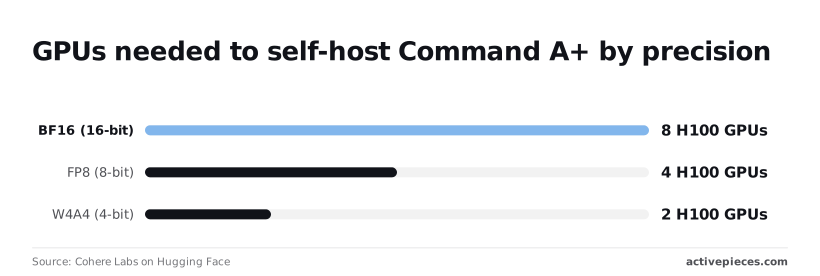
Each step down in precision halves the hardware, so the 4-bit build needs a quarter of the full-precision cluster. Whoever owns that cluster also owns patching and access, which is a heavier commitment than one API key.
Connecting Command A+ to automation workflows
You can connect it three general ways today, and the simplest is an HTTP request step that calls OpenRouter directly, because none of them needs a vendor-specific integration for Command A+.
Whichever you pick, settle first who owns the OpenRouter key: a key issued under a named person's account stops working when that person leaves, and the workflow stops with it. The three routes below run from least to most setup.
Option 1: an HTTP request step
You need the OpenRouter chat completions address, an authorization header carrying an API key, and a request body that names the Command A+ model ID and passes the messages.
Store the key in the platform's secret or connection field, never pasted into the step itself, and issue it from a team account with a spending limit set.
When you want to see exactly what's sent and returned on a single, well-defined call, such as classifying a ticket or summarising a document, this route fits. The cost is that you parse the response and handle errors and retries yourself.
Option 2: an AI step with an OpenAI-compatible provider
This route needs an AI step that accepts a custom provider, plus the OpenRouter base address, the same key, and the model ID entered as text. OpenRouter follows the OpenAI request format, so the step treats Command A+ like any other model.
If you already run several AI steps and want Command A+ to sit beside them, with prompts and outputs handled the way they are today, this route fits.
Check that the platform lets you type a model ID freely; if it restricts you to a fixed list, this route is closed.
Activepieces has nothing specific to Command A+; on a paid plan you can use your own provider key, so model spend lands on your own provider bill.
A platform that resells you its own model has picked yours and priced it before you opened the product, and Command A+ would never reach that menu.
On Activepieces the Plus plan is $20 a month, and with your own AI keys every AI step costs 1 credit while the model spend lands on your own provider account, so the cost per task you measure is Command A+'s own, at your rate.
The same setup is reachable from Claude, ChatGPT, Cursor or any MCP client.
Option 3: an MCP server
This route needs an MCP server, a service that exposes tools to a model, and a client that can call it. It fits only when the work is agentic, with Command A+ choosing among tools across several steps.
It carries the largest ownership burden, because the server holds its own credentials and permissions, and someone must be named to review them. For a straightforward comparison on cost and speed, it adds moving parts without adding information.
Worth checking against a plan that does not meter every step: one credit covers a whole run on Activepieces.
Command A+ tested on three automation tasks
On 2026-10-23 we sent the same three tasks to Command A+ and openai/gpt-5.4-mini through OpenRouter, one call each.
We ran Command A+ (cohere/command-a-plus on OpenRouter, default settings) and openai/gpt-5.4-mini on three jobs: sort a support ticket, pull fields from an invoice, and summarise an email thread.
Each output was checked against a known answer, so a wrong field counts as a miss, not a matter of taste.
Results, speed and cost per task
A workflow that waits 14.6 seconds on one step will stall or time out where one waiting 0.8 seconds won't, so this difference determines whether the model is viable for your system.
That is the invoice result: Command A+ was quicker on ticket sorting and slower on the other two, and invoice extraction is where the gap matters.
This is a small, indicative run, not a benchmark.
| Task | Model | Seconds to respond |
|---|---|---|
| Ticket sorting | Command A+ | 0.5 |
| Ticket sorting | openai/gpt-5.4-mini | 0.8 |
| Invoice extraction | Command A+ | 14.6 |
| Invoice extraction | openai/gpt-5.4-mini | 0.8 |
| Email summary | Command A+ | 1.4 |
| Email summary | openai/gpt-5.4-mini | 0.9 |
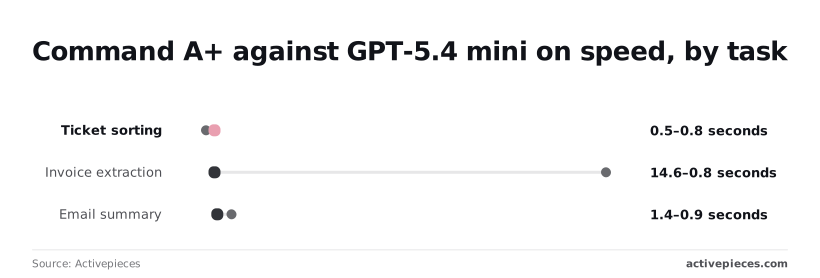
At 0.5 against 0.8 seconds, ticket sorting favours Command A+, but 0.3 seconds is too small to change a design since the refactoring cost would exceed any savings.
The email summary gap of 0.5 seconds is likewise tolerable in a background job, meaning the choice between models isn't driven by performance here. The invoice gap is the one to plan around.
That is not enough to set production timeouts: three tasks, one call per model per task, and one day. A single call can swing in latency for reasons unrelated to the model.

Before you commit, run your own documents through both models under the key and budget your team owns, and repeat each call enough times to see the spread.
What Command A+ means for cost and speed
Judge Command A+ against openai/gpt-5.4-mini on cost and seconds per task, not on listed token prices alone. Each model spends a different number of tokens on the same job.
The chart shows our measured median seconds per task for both models across the three tasks.
Read the gap task by task rather than as one average, since a single task can reverse the order.
How token pricing sets Command A+ task cost
Because a listed price is charged per token, the cost of a task is that price multiplied by the tokens the model actually reads and writes.
A model with a lower rate that writes longer answers can cost more per task than a dearer, terser one.
Compare dollars per completed task, taken from the usage your own key reports.
A model with a lower rate that writes longer answers can cost more per task than a dearer, terser one.
Why Command A+ timings may differ on OpenRouter
We report the single call result, since each task was sent once and calls can vary with load. Through OpenRouter, the provider that serves a given call can change, so your timings may differ from ours.
Repeat each call and look at the spread before you set a timeout or promise a turnaround to anyone downstream.
What third-party benchmarks say about Command A+
Each model leads on some tasks and trails on others, so third-party benchmark scores for the two are uneven.
A score earned on one kind of task says little about another, so match the benchmark to your job before you rely on it. If no benchmark resembles your documents, your own test set is the only evidence you have.
What to watch next with Command A+
Watch the OpenRouter listing for changes to price, limits and provider, and re-run your own test whenever one moves. Evidence gathered under old terms stops describing what you'd pay today.
Command A+ listing details to re-check
Re-read the model page before each decision, not just once. Check the per-token prices for input and output separately, since your cost comparison depends on which side your workflow uses more.
Check the context limit and any output cap, because a cap that tightens can truncate results without raising an error. Note which provider is serving the model, as routing can shift.
Finally, confirm the model identifier is unchanged, so your automation keeps calling the model you tested. If any of these changes, your earlier numbers describe a different deal.
A one-hour test for your own workflow
Before you start, name the person who owns the API key you'll use, and keep that key for this test only.
Then the steps below show the whole comparison in order, so you can see where a decision is made on evidence and not on impression.
- Pick one workflow step, not the whole pipeline.
- Swap that step's model to Command A+, leaving the prompt and settings as they're.
- Run 20 of your own real inputs, enough to expose odd cases that a single sample hides.
- Compare cost, speed and output against your current model, side by side.
- Decide: adopt, keep your current model, or retest later.
Whatever the result, record it with the date, so the next listing change has a baseline to be measured against.
What Activepieces does about this
Activepieces has no Command A+ integration, and we won't pretend otherwise. What it offers is the route this article keeps returning to: the model is reached through an HTTP request step or an AI step pointed at OpenRouter's OpenAI-compatible address.
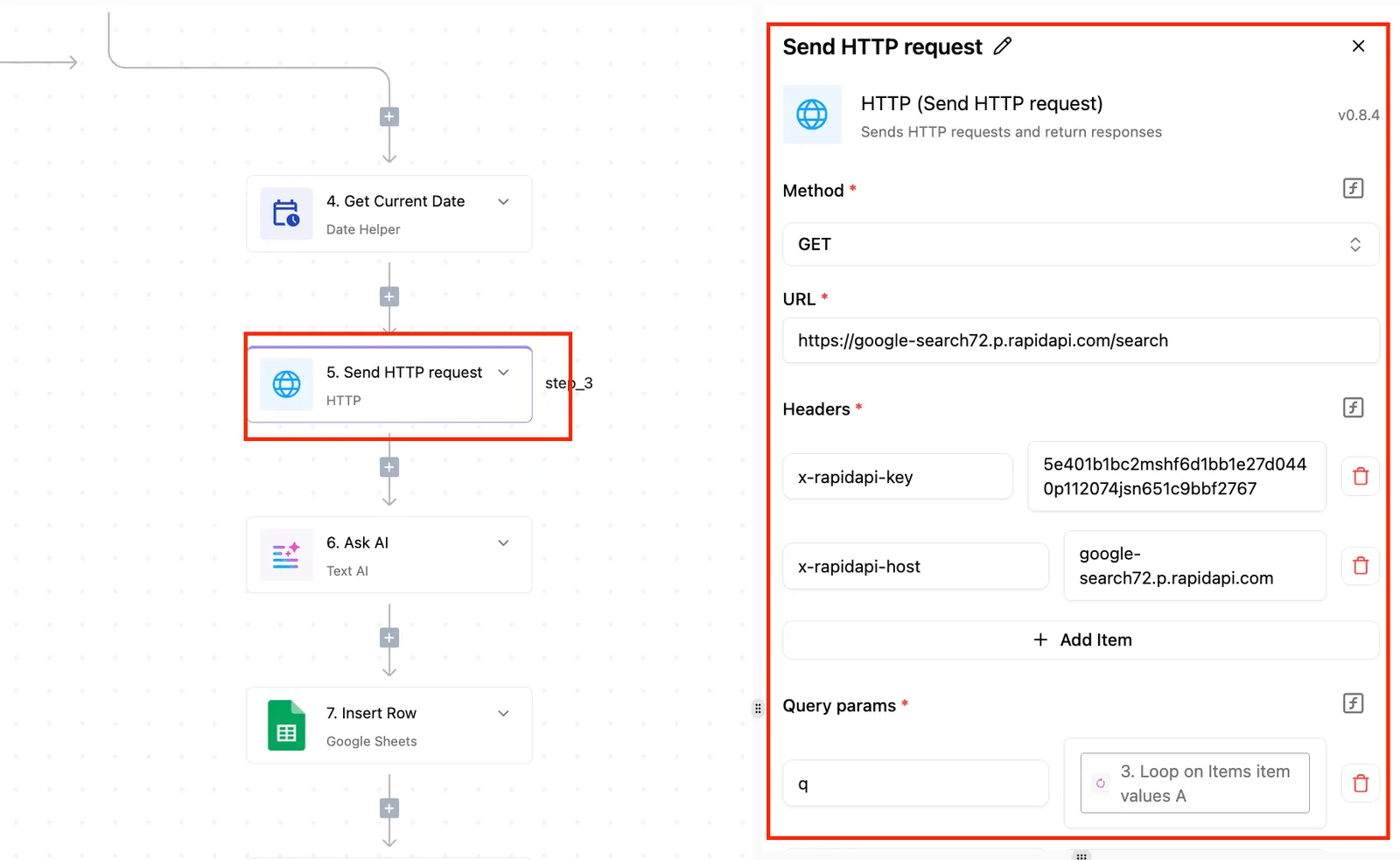
You can run the one-hour test above inside a single flow, swapping one step's model and leaving the rest alone.
The cost side of that test is where the platform matters. On the Plus plan, at $20 a month, you can bring your own AI provider key. Each AI step then costs 1 credit, and the model spend lands on your own OpenRouter account.
The per-task dollar figure your key reports is therefore Command A+'s own, at your rate, which is the number the comparison against openai/gpt-5.4-mini needs. A platform that resells you its own model has already chosen and priced it for you.

The code is open source under the MIT licence, so the step that holds your key and calls the model is something your team can read and, if it wants, host itself.
That keeps the ownership question from earlier simple: the key is stored in a connection your team controls, with the spending limit set on the OpenRouter side.
If you would rather drive the same flows from Claude, ChatGPT, Cursor or another MCP client, Activepieces exposes them there too. That fits the agentic case, once your own test shows Command A+ earns a place in it.
Related reading
Running the numbers
See what the same workload costs here.
Free forever plan, and every paid plan self-hosts at no extra cost.
See pricing Talk to sales