

Overview
Capabilities give the AI extra skills that the model can’t do on its own, such as searching the web. You choose the service behind each one, once, for the whole platform. Builders don’t need their own keys. Go to Platform admin → AI Center → Capabilities.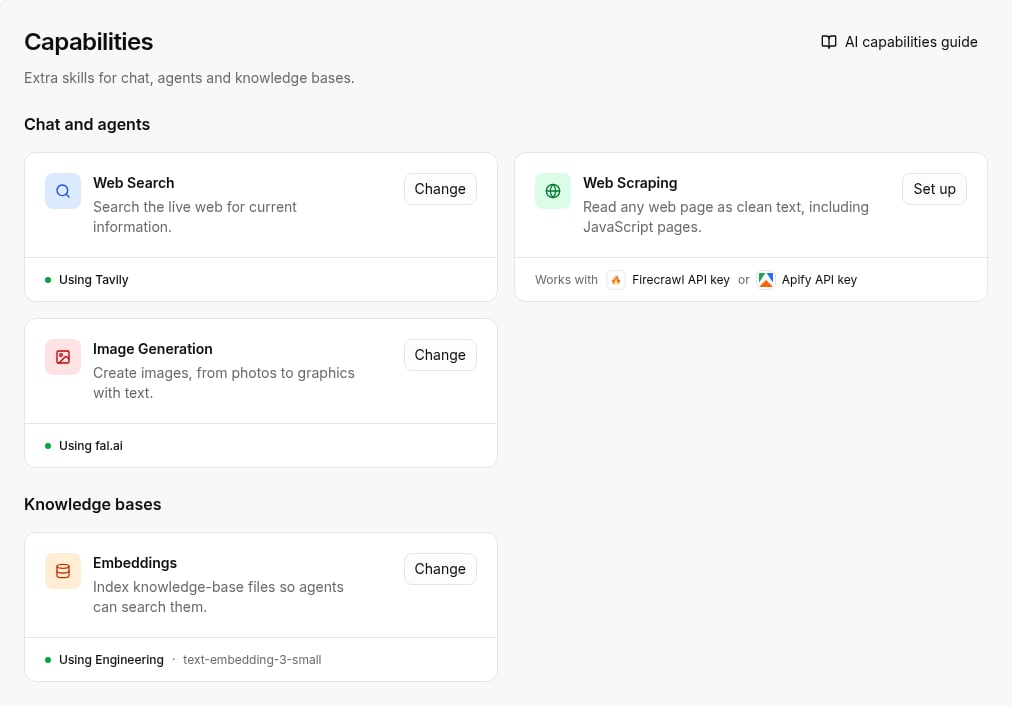
Capabilities are available on Cloud and self-hosted Enterprise. Community Edition doesn’t have this page.
The four capabilities
The page has two groups. Chat and agents
Knowledge bases
An AI provider key used for a capability must serve all projects. Add or edit keys on the Providers page.
What the card shows
The bottom of each card tells you where the capability stands:- Using and a name: the capability is on. The name is the service or key it runs on, followed by the model when there is one.
- Works with and a list: nothing serves the capability yet. The list shows which keys can.
Set up a capability
1
Open the card
Click Set up on the capability. If it is already in use, the button says Change.
2
Pick the source
When there is more than one option, pick it under Source: one of your AI provider keys or an outside service.
3
Enter the details
For an outside service, paste its API key. The dialog links to where you get one. For an AI provider key, pick the Image model or Embedding model when the capability needs one.
4
Save
Click Save.
Reset a capability
Hover the card and click the trash icon to Reset it. This removes the saved API key or key choice. The capability then goes back to your chat key, if that key supports it. Otherwise it turns off.Providers vs capabilities
Providers connect the AI models that chat, agents and AI steps run on. Capabilities add skills on top of those models: web search, web scraping, image generation and embeddings.Related
- Providers and keys
- Knowledge bases
- API reference: list capabilities, set up, update, reset.